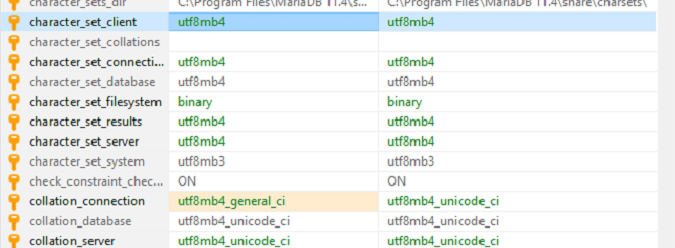
Internet suggests a characted encoding issue. I did initially have my mariadb on the default which was … I forget. Something bad. I’ve reset it and restored from a script which I thought would clear things up. Now it’s using utf8mbf and utf8mb4 ci.
I do want to support Spanish on my wiki at a minimum. I assume I don’t need or want utf-16.
The problem was the charset on the tables was still set to “CHARSET=latin1 COLLATE=latin1_swedish_ci;”
Backing up the db and replacing it with:
CHARSET=utf8mb4 COLLATE=utf8mb4_bin;
Allows the files to be reset. Thank you! Problem seems solved.
Anyone who finds this and has a similar issue this is how I fixed it.
I am on Tomcat war and using Mariadb.
First I connected to my db and fixed the encoding and collator globally and for the session.
SET global collation_connection = 'utf8mb4_bin';
SET global collation_database = 'utf8mb4_bin';
SET global character_set_server = 'utf8mb4';
SET global collation_server = 'utf8mb4_bin';

SET collation_connection = 'utf8mb4_bin';
SET collation_database = 'utf8mb4_bin';
SET character_set_server = 'utf8mb4';
SET collation_server = 'utf8mb4_bin';
Than I exported the database and the data (I first tried this in a test environment thankfully and in HeidiSQL forgot to do the data the first time) as a single sql file including drop statements. I also made sure to use UTF-8 as the encoding everywhere I could including the backup scripts just to be sure the data would (hopefully) get properly converted somewhere along the way if it needed to.
In the backup sql script I searched and replaced “CHARSET=latin1 COLLATE=latin1_swedish_ci”
for “CHARSET=utf8mb4 COLLATE=utf8mb4_bin”.
Then I ran the script to restore all the tables and data with the proper encoding.
The next step was going through every single installed extension and computing the changes and using “reset” to get all the translated pages that didn’t install properly when the encoding was wrong. Be careful. Everything is a page, so you’re going to find some pages with changes that you intentionally made. It’s monotonous. I accidentally reset my homepage for instance, but was able to rollback that change.