Hi devs,
In the context of Developing XWiki using LLMs - #16 by vmassol , I’d like to set up a Claude Routine to take some sonarcloud issue every day and propose a PR to fix it. I can set up everything in the Routine except the MCP server config for sonarcloud, which needs to be setup in the repo that is cloned by the Routine.
Would you be ok for me to make an experiment and letting me push a .mcp.json file to the root of the xwiki-platform repo?
The .mcp.json that I’d like to commit is:
{
  "mcpServers": {
    "sonarqube": {
      "command": "docker",
      "args": [
        "run", "-i", "--rm", "--pull=always",
        "-e", "SONARQUBE_URL",
        "-e", "SONARQUBE_TOKEN",
        "-e", "SONARQUBE_ORG",
        "-e", "SONARQUBE_PROJECT_KEY",
        "-e", "SONARQUBE_TOOLSETS",
        "-e", "SONARQUBE_ADVANCED_ANALYSIS_ENABLED",
        "-v", "${PWD}:/app/mcp-workspace:rw",
        "mcp/sonarqube"
      ],
      "env": {
        "SONARQUBE_URL": "https://sonarcloud.io",
        "SONARQUBE_TOKEN": "${SONARQUBE_TOKEN}",
        "SONARQUBE_ORG": "xwiki",
        "SONARQUBE_PROJECT_KEY": "org.xwiki.platform:xwiki-platform",
        "SONARQUBE_TOOLSETS": "cag,projects,analysis,issues",
        "SONARQUBE_ADVANCED_ANALYSIS_ENABLED": "true"
      }
    }
  }
}
```

And if you're curious how you could use use it: https://github.com/SonarSource/getting-started-agentic-analysis-claude-code

We can decide later if we want to push some skills/claude.md for it (it's quite interesting actually).

FWIW I've also looked at using the sonarcloud-cli but it doesn't seem built to be usable in a non-local manner (https://github.com/SonarSource/sonarqube-cli ). If it had I could have set it up as part of the Routine script config.

WDYT?

Thanks
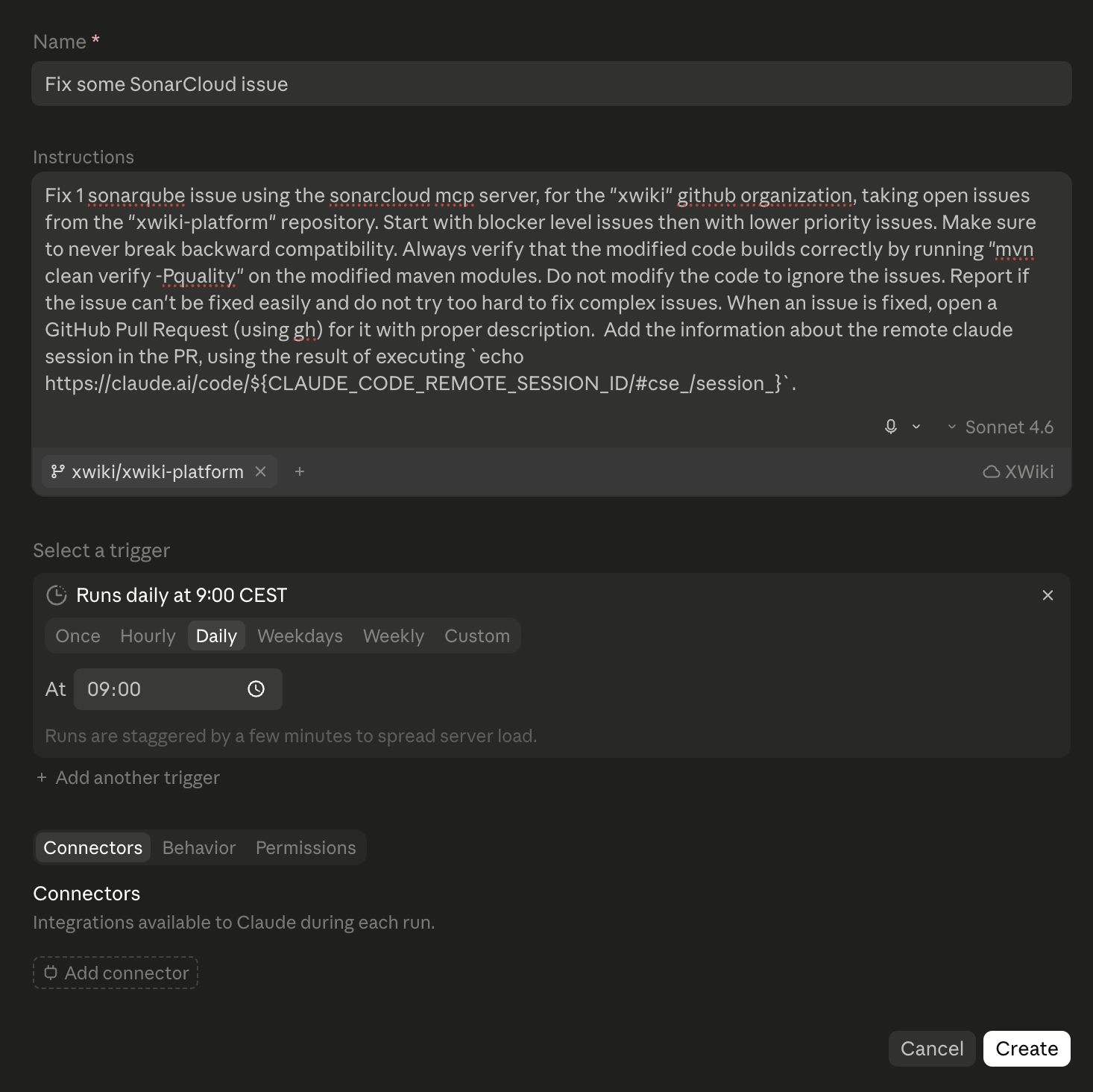
If you’re curious, ATM I have this prompt (which will need to be improved for sure):
Fix 1 sonarqube issue using the sonarcloud mcp server, for the "xwiki" github organization, taking open issues from the "xwiki-platform" repository. Start with blocker level issues then with lower priority issues. Make sure to never break backward compatibility. Always verify that the modified code builds correctly by running "mvn clean verify -Pquality" on the modified maven modules. Do not modify the code to ignore the issues. Report if the issue can't be fixed easily and do not try too hard to fix complex issues. When an issue is fixed, open a GitHub Pull Request (using gh) for it with proper description. Add the information about the remote claude session in the PR, using the result of executing `echo https://claude.ai/code/${CLAUDE_CODE_REMOTE_SESSION_ID/#cse_/session_}`.
I have also created a custom environment with:
- Custom domains (package managers + *.xwiki.org + sonarcloud.io)
- GH_TOKEN env variable
- Script to execute:
apt update && apt install -y gh
Updated prompt:
Fix 1 open sonarqube issue using the sonarqube mcp server, for the "xwiki" github organization, taking open issues from the "xwiki-platform" repository. Start with blocker level issues then with lower priority issues. Don't pick an issue that you've already worked or fixed in a previous execution. Make sure to never break backward compatibility. Always verify that the modified code builds correctly by running "mvn clean verify -Pquality" on the modified maven modules (use the settings.xml defined below before running maven). Do not modify the code to ignore the issues. If the issue can't be fixed easily or takes too long to fix (e.g. over 15 minutes), pick another issue. Whenever an issue is fixed, open a GitHub Pull Request (using gh) for it with proper description. If the issue is about security make sure to not mention anything related to security since that could reveal a vulnerability to potential attackers if they check our commit logs. Be a bit cryptic about what's fixed in this case.  Make sure  to have one PR per issue and make sure that the commits are for a PR are only relevant for that PR.  Add a URL link to the sonarcloud issue in the PR. After the PR has been created use the sonarqube MCP server to set the status to "Accepted" for the issue, with a comment containing the  link to the PR issue. Use apache commons libraries but only if they make sense and reduce boilerplate code that we would write otherwise.

~/.m2/settings.xml to use to build XWiki modules:
```
<settings>
  <profiles>
    <profile>
      <id>xwiki</id>
      <repositories>
        <repository>
          <id>xwiki-snapshots</id>
          <name>XWiki Nexus Snapshot Repository</name>
          <url>https://nexus-snapshots.xwiki.org/repository/snapshots/</url>
          <releases>
            <enabled>false</enabled>
          </releases>
          <snapshots>
            <enabled>true</enabled>
          </snapshots>
        </repository>
        <repository>
          <id>xwiki-releases</id>
          <name>XWiki Nexus Releases Repository Proxy</name>
          <url>https://nexus-snapshots.xwiki.org/repository/public-proxy</url>
          <releases>
            <enabled>true</enabled>
          </releases>
          <snapshots>
            <enabled>false</enabled>
          </snapshots>
        </repository>
      </repositories>
      <pluginRepositories>
        <pluginRepository>
          <id>xwiki-snapshots</id>
          <name>XWiki Nexus Plugin Snapshot Repository</name>
          <url>https://nexus-snapshots.xwiki.org/repository/snapshots/</url>
          <releases>
            <enabled>false</enabled>
          </releases>
          <snapshots>
            <enabled>true</enabled>
          </snapshots>
        </pluginRepository>
        <pluginRepository>
          <id>xwiki-releases</id>
          <name>XWiki Nexus Plugin Releases Repository Proxy</name>
          <url>https://nexus-snapshots.xwiki.org/repository/public-proxy</url>
          <releases>
            <enabled>true</enabled>
          </releases>
          <snapshots>
            <enabled>false</enabled>
          </snapshots>
        </pluginRepository>
      </pluginRepositories>
    </profile>
  </profiles>
  <activeProfiles>
    <activeProfile>xwiki</activeProfile>
  </activeProfiles>
</settings>
```

Here's general knowledge about xwiki-platform:

## Project Overview

XWiki Platform is a generic wiki platform offering runtime services for applications built on top of it. It is part of the XWiki.org software forge alongside XWiki Commons and XWiki Rendering, all sharing the same version (`18.3.0-SNAPSHOT`).

- **Issue Tracker:** https://jira.xwiki.org/browse/XWIKI (not GitHub Issues)
- **CI:** https://ci.xwiki.org with Develocity at https://ge.xwiki.org/scans
- **Dev Guide:** https://dev.xwiki.org/xwiki/bin/view/Community/

## Build Commands

```bash
# Standard build (no integration tests, fast)
mvn clean install -Plegacy,integration-tests,snapshot -Dxwiki.checkstyle.skip=true -Dxwiki.surefire.captureconsole.skip=true -Dxwiki.revapi.skip=true -DskipITs

# Build with integration tests
mvn clean install -Plegacy,integration-tests,snapshot -Dxwiki.checkstyle.skip=true -Dxwiki.surefire.captureconsole.skip=true -Dxwiki.revapi.skip=true

# Build a specific module
mvn clean install -pl xwiki-platform-core/xwiki-platform-<module> -Plegacy,snapshot

# Build distribution
mvn clean install -f xwiki-platform-distribution/pom.xml -Plegacy,integration-tests,snapshot

# Skip all tests
mvn clean install -DskipTests -Plegacy,snapshot
```

## Running Tests

```bash
# Run all unit tests for a module
mvn test -pl xwiki-platform-core/xwiki-platform-<module>

# Run a specific test class
mvn test -pl xwiki-platform-core/xwiki-platform-<module> -Dtest=MyTestClass

# Run a specific test method
mvn test -pl xwiki-platform-core/xwiki-platform-<module> -Dtest=MyTestClass#myMethod

# Run integration tests
mvn verify -pl xwiki-platform-core/xwiki-platform-<module> -Pintegration-tests
```

Functional (Docker-based) tests live in `xwiki-platform-distribution/xwiki-platform-distribution-flavor/xwiki-platform-distribution-flavor-test/`.

## Module Structure

```
xwiki-platform/
├── xwiki-platform-tools/        # Maven build plugins and tools
├── xwiki-platform-core/         # 100+ feature modules (main development area)
│   ├── xwiki-platform-oldcore   # Legacy core (com.xpn.xwiki.*) — central XWiki engine
│   └── xwiki-platform-<feature> # Feature modules (rendering, security, livedata, etc.)
└── xwiki-platform-distribution/ # WAR packaging, flavor, functional tests
```

Key core modules:/tok
- **xwiki-platform-oldcore** — The central XWiki engine (`com.xpn.xwiki`). Avoid adding new code here; prefer new feature modules.
- **xwiki-platform-rendering-\*** — Content rendering pipeline
- **xwiki-platform-security-\*** — Authentication, authorization, crypto
- **xwiki-platform-extension-\*** — Extension/plugin management system
- **xwiki-platform-flamingo** — Default skin/theme
- **xwiki-platform-livedata** — Dynamic data table UI component
- **xwiki-platform-ckeditor / xwiki-platform-blocknote** — WYSIWYG editors

## Architecture Concepts

**Component System:** XWiki uses its own IoC container (from xwiki-commons). Components are declared with `@Component` and injected with `@Inject`. Role interfaces use `@Role`; `@Singleton` and `@InstantiationStrategy` control lifecycle.

**OSGi Manifests:** Each JAR has an OSGi manifest generated by the Maven Bundle Plugin (see `xwiki-platform-core/pom.xml`). Modules declare their extension features via `xwiki.extension.features` properties.

**Legacy Modules:** The `legacy` profile activates backward-compatibility shim modules (suffix `-legacy`). These re-export deprecated APIs and should not receive new logic.

**XWiki Context (`XWikiContext`):** A request-scoped object threaded through much of oldcore. New code should avoid it in favor of component-based APIs.

**Event System:** Components communicate via `ObservationManager`. Events extend `AbstractEvent`; listeners implement `EventListener`.

## Frontend

The project uses an Nx monorepo (pnpm workspace) for JavaScript packages:

```bash
# Install Node dependencies (run from repo root)
pnpm install

# Build all JS packages
pnpm run build

# Build a specific package (e.g., blocknote)
pnpm --filter @xwiki/blocknote run build
```

JS sources live inside their respective core modules (e.g., `xwiki-platform-livedata`, `xwiki-platform-ckeditor`, `xwiki-platform-blocknote`).

## Code Quality

- **Checkstyle:** Enforced by default; skip with `-Dxwiki.checkstyle.skip=true`
- **RevAPI:** Checks backward API compatibility; skip with `-Dxwiki.revapi.skip=true`
- **Console capture:** Surefire checks tests don't write to stdout; skip with `-Dxwiki.surefire.captureconsole.skip=true`

## Key Maven Profiles

| Profile | Purpose |
|---------|---------|
| `legacy` | Includes backward-compatibility modules (almost always needed) |
| `integration-tests` | Activates IT execution via Failsafe |
| `snapshot` | Enables XWiki snapshot repositories |
| `distribution` | Includes distribution packaging module |
| `clover` | Code coverage analysis |
Note that until we have CLAUDE.md file in our repo, I’ve copied it in the prompt.
I’ve improved a bit the prompt:
Fix 1 open sonarqube issue using the sonarqube mcp server, for the "xwiki" github organization, taking open issues from the "xwiki-platform" repository.

Rules:
* Start with blocker level issues then with lower priority issues.
* Don't pick an issue that you've already worked or fixed in a previous execution.
* Make sure to never break backward compatibility.
* Always verify that the modified code builds correctly by running "mvn clean verify -Pquality" on the modified maven modules (use the settings.xml defined below before running maven).
* Do not modify the code to ignore the issues. If the issue can't be fixed easily or takes too long to fix (e.g. over 15 minutes), pick another issue.
* Whenever an issue is fixed, open a GitHub Pull Request (using gh) for it with proper description.
* For commits inside the PR,  use the following format:
   ```
   [Misc] <short description of problem here. Mention SonarQube in the description.>
   * <one of several bullet points to explain details if need be>
   ```
* Label the PR in GitHub with the `llm-agent` label
* If the issue is about security make sure to not mention anything related to security since that could reveal a vulnerability to potential attackers if they check our commit logs. Be a bit cryptic about what's fixed in this case.
* Make sure  to have one PR per issue and make sure that the commits are for a PR are only relevant for that PR.
* Add a URL link to the sonarcloud issue in the PR.
* After the PR has been created use the sonarqube MCP server to set the status to "Accepted" for the issue, with a comment containing the  link to the PR issue.
* Use apache commons libraries but only if they make sense and reduce boilerplate code that we would write otherwise.
* At the end of the PR summary indicate how many tokens were used so far (don't add this as a comment)
Note that Label the PR in GitHub with the llm-agent label so that it’s easy to filter out in the list of PRs.
I’m going to add back the 1 per day schedule.