Improving Object Editor Usability for StaticList Fields (CSS-only approach)

Motivation

When editing objects in XWiki, especially classes with StaticList fields (single choice radio), the default object editor layout can become hard to read:

  • StaticList radio buttons are rendered inline, without line breaks
  • Listed object blocks visually blend into the surrounding UI
  • Important objects are easy to overlook (even when already selected)


After I work allot with the object editor this was particularly problematic for for me.

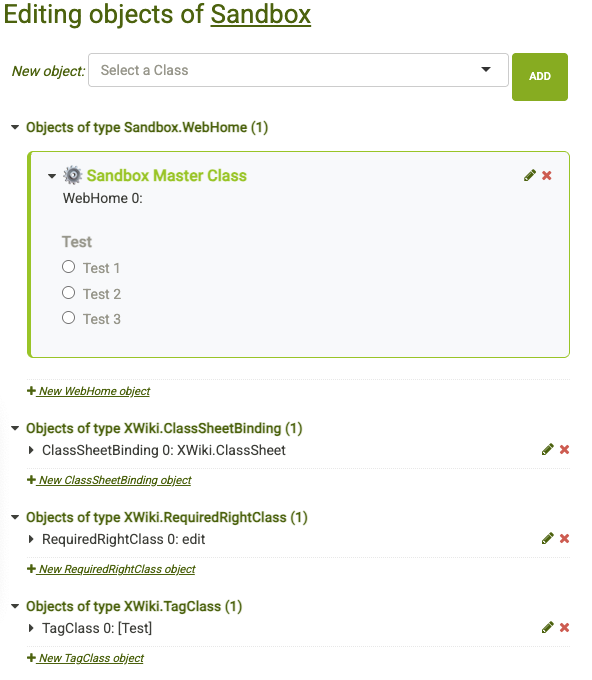
I was more looking for something like that:


Improvements achieved

  • Clear visual separation of the object
  • radio button list ist more readable and accessible
  • Object purpose is immediately visible

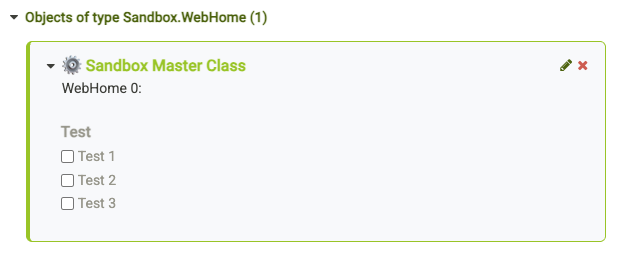
So I improved the layout for certain class object that i want to see better by using only a XWiki.StyleSheetExtension, without JavaScript or template overrides.


Reproducible Example (Sandbox)

To make this easy to reproduce on a clean XWiki installation, this example uses the Sandbox.

Setup

  1. Create a class in Sandbox.WebHome
  2. Add a Static List property:
    • Single choice (radio buttons)
    • No multiselect
    • Example values: value1=Test 1|value2=Test 2|value3=Test 3
  3. Add one object of this class to Sandbox.WebHome
  4. Open the Object Editor

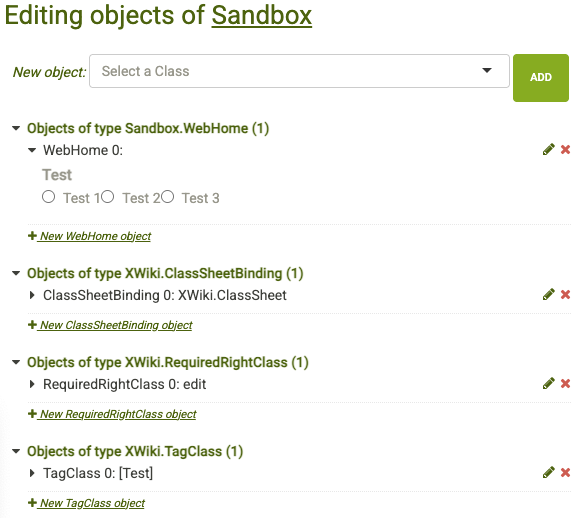
Default Rendering (Before)

Typical issues with the default rendering:

  • All radio buttons appear inline
  • No visual grouping or container
  • Class purpose is not obvious

CSS-Based Enhancement using StyleSheetExtension

The following CSS is applied via an object of type XWiki.StyleSheetExtension just for the selected class.

Goals

  • Add a visual container around the object
  • Render StaticList radio buttons one per line
  • Improve object header readability

StylesheetExtension Example

/* Improve Object Editor Usability (Sandbox Example) */

/* Visual container for ALL Sandbox.WebHome objects (0..n) */
div.xobject[id^="xobject_Sandbox\.WebHome_"] {
  background: #f8f9fb;
  border: 1px solid #94c600;
  border-left: 4px solid #94c600;
  border-radius: 6px;
  padding: 0.5em;
  margin: 0.5em 0 0.5em 0;
}

/* StaticList (radio buttons): one option per line */
#xclass_Sandbox\.WebHome_content
dd > label.xwiki-form-listclass[for^="xwiki-form-test"] {
  display: block !important;
  margin: 0.25em 0 !important;
  cursor: pointer;
}

/* De-emphasize technical class name */
div.xobject[id^="xobject_Sandbox\.WebHome_"] > .xobject-title h3 {
  font-size: 10px;
  color: #999;
}

/* Human-readable object title */
div.xobject[id^="xobject_Sandbox\.WebHome_"] > .xobject-title h3::before {
  content: "āš™ļø Sandbox Master Class";
  display: block;
  font-size: 16px;
  font-weight: 600;
  color: #94c600;
  margin-bottom: 0.4em;
}

/* More spacing at the top of the object content */
div.xobject[id^="xobject_Sandbox\.WebHome_"] > .xobject-content {
  padding: 25px 14px 8px;
}

Result (After)

Improvements achieved

  • Clear visual separation of the object
  • radio button list ist more readable and accessible
  • Object purpose is immediately visible
  • No impact on other classes or editors
  • Fully reversible and maintainable

Potential Improvement for XWiki Core

This experiment highlights a possible UX improvement in XWiki itself:

  1. StaticList fields (single choice) could be rendered with line breaks by default
  2. The ClassSheetBinding XWiki.ClassSheet could have some kind of Pretty Name to be displayed above the technical class name

This would improve usability without breaking existing functionality and could potentially be configurable per property or class.

Feedback Welcome

I’d be interested in feedback.

Thanks for reading!

1 Like

As i adopted this for the most common objects in my system this turns the Object Editor from a purely technical list into a visually structured configuration dashboard.


1 Like

Thank you for sharing your improvements! It’s an interesting idea :slight_smile:

The display of the radio buttons for static list look like an oversight. I agree that they look off and we should at least add spacing between the items ^^’
Did you raise a bug ticket about this? If not, I can create the ticket (and I’ll probably provide a solution soon enough too).

The fact that the radio buttons are inline could be a feature in some other use cases. We want to make sure we don’t break what was working before by changing that. I kinda agree with changing it (IMO the benefits are significantly higher than the drawbacks), but we would need to put the change in the release notes so that admins migrating can notice.

From what I understand, the object purpose is the pretty name of the class? I personally agree it would be nice to display those. The cost of displaying those is that we increase clutter. This might not be something worth on a technical page like the class editor. If we rethink a bit the way we show the technical name, the improvement would be similar and we wouldn’t add any clutter. I’m on the fence for this.

I’m not yet sure how we’d implement this for XWiki Standard. Looking at your CSS, it doesn’t seem like it would scale easily to cover all classes. We really don’t want people to have to write a CSS ruleset to have a working class, so we pretty much have to fill one up from a set of metadata for the class we’d ask for in the class creation/edition form. Things like:

  • Pretty name
  • Box color (we might want to force the choice in a list of standard XWiki colors so that we’re sure it’s always in the colortheme… )
  • Icon

Note that App Within Minute already has an icon used for presentation.

@tkrieck will probably be interested in the topic :slight_smile:

2 Likes

I agree. That’s exactly why I reduced the margins in the edit of my first post – to avoid adding unnecessary visual clutter.

In my day-to-day work I often deal with custom macros, which means pages containing many objects such as XWiki.StyleSheetExtension, XWiki.TagClass, XWiki.TranslationDocumentClass, XWiki.WikiMacroClass, and multiple XWiki.WikiMacroParameterClass instances. In that situation, the object editor can indeed feel quite ā€œdenseā€ if the layout gets to big.

That said, I’ve found it extremely helpful to visually distinguish object types at a glance. Using a consistent color and icon scheme allows me to quickly identify the right object without reading technical class names – especially on pages with many objects. For me, this significantly improves usability :wink:

No, I didn’t open a ticket yet, because I wasn’t sure which parts of the idea would really fit as a core enhancement.

My intention was to first gather feedback, and then hopefully create a more focused and actionable ticket.

1 Like

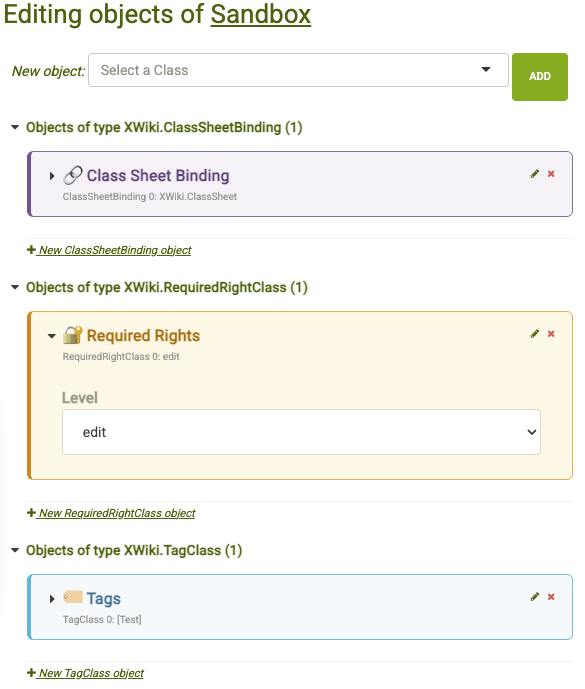
I added a default setting in gray colors, without a bold heading, along with a few color and icon sets for testing. Below the screenshot, you’ll find the full ready-to-test CSS snippet :wink:


/* ----------------------------------------------------------
   Global object class group styling
   ---------------------------------------------------------- */

/* Base card styling for all XWiki objects */
div.xobject {
  border-radius: 6px;
  padding: 0.4em;
  margin: 0.4em 0;
}

/* Human-readable object header (shared) */
div.xobject
> .xobject-title h3::before {
  display: block;
  font-size: 16px;
  font-weight: 600;
  margin-bottom: 0.4em;
}

/* Space for human-readable header */
div.xobject
> .xobject-content {
  padding: 25px 14px 8px;
}

/* De-emphasize technical class name */
div.xobject[id^="xobject_XWiki."]
> .xobject-title h3 {
  font-size: 10px;
  color: #999;
  margin: 0;
}

/* ----------------------------------------------------------
   StaticList UX – Object Editor
   One option per line, better readability
   ---------------------------------------------------------- */

/* StaticList radios & checkboxes: one item per line */
div.xobject
> .xobject-content dd
> label.xwiki-form-listclass {
  display: block !important;
  margin: 0.25em 0 !important;
  cursor: pointer;
}

/* Improve input alignment */
.xobject dd
> label.xwiki-form-listclass
> input {
  margin-right: 0.4em;
  vertical-align: middle;
}

/* ----------------------------------------------------------
   Default (Neutral Grey)
   ---------------------------------------------------------- */

div.xobject {
  background: #f7f7f7;
  border: 1px solid #dcdcdc;
  border-left: 4px solid #bdbdbd;
}

div.xobject
> .xobject-title h3::before {
  content: "āš™ļø ";
  color: #6c757d;
  display: inline;
}

/* ----------------------------------------------------------
   XWiki.ClassSheetBinding
   ---------------------------------------------------------- */

div.xobject[id^="xobject_XWiki\.ClassSheetBinding_"]
> .xobject-title h3::before {
  content: "šŸ”— Class Sheet Binding";
  color: #5e3f7a;
  display: block;
}

div.xobject[id^="xobject_XWiki\.ClassSheetBinding_"] {
  background: #f6f3f8;
  border: 1px solid #8a6d9f;
  border-left: 4px solid #6f5499;
}

/* ----------------------------------------------------------
   XWiki.RequiredRightClass
   ---------------------------------------------------------- */

div.xobject[id^="xobject_XWiki.RequiredRightClass_"]
> .xobject-title h3::before {
  content: "šŸ” Required Rights";
  color: #b06d00;
  display: block;
}

div.xobject[id^="xobject_XWiki.RequiredRightClass_"] {
  background: #fff8e6;
  border: 1px solid #f0ad4e;
  border-left: 4px solid #d58512;
}


/* ----------------------------------------------------------
   XWiki.StyleSheetExtension
   ---------------------------------------------------------- */

div.xobject[id^="xobject_XWiki.StyleSheetExtension_"]
> .xobject-title h3::before {
  content: "šŸŽØ Style Sheet Extension";
  color: #4b2e83;
  display: block;
}

div.xobject[id^="xobject_XWiki.StyleSheetExtension_"] {
  background: #f6f5fb;
  border: 1px solid #6f42c1;
  border-left: 4px solid #6f42c1;
}

/* ----------------------------------------------------------
   XWiki.TagClass
   ---------------------------------------------------------- */

div.xobject[id^="xobject_XWiki.TagClass_"]
> .xobject-title h3::before {
  content: "šŸ·ļø Tags";
  color: #31708f;
  display: block;
}

div.xobject[id^="xobject_XWiki.TagClass_"] {
  background: #f4f9fc;
  border: 1px solid #5bc0de;
  border-left: 4px solid #46b8da;
}

/* ----------------------------------------------------------
   XWiki.TranslationDocumentClass
   ---------------------------------------------------------- */

div.xobject[id^="xobject_XWiki.TranslationDocumentClass_"]
> .xobject-title h3::before {
  content: "šŸŒ Translations";
  color: #434190;
  display: block;
}

div.xobject[id^="xobject_XWiki.TranslationDocumentClass_"] {
  background: #f5f7ff;
  border: 1px solid #6f7cff;
  border-left: 4px solid #5a67d8;
}

/* ----------------------------------------------------------
   XWiki.UIExtensionClass
   ---------------------------------------------------------- */

div.xobject[id^="xobject_XWiki.UIExtensionClass_"]
> .xobject-title h3::before {
  content: "šŸ–„ļø UI Extension";
  color: #31708f;
  display: block;
}

div.xobject[id^="xobject_XWiki.UIExtensionClass_"] {
  background: #eef9fd;
  border: 1px solid #5bc0de;
  border-left: 4px solid #31b0d5;
}

/* ----------------------------------------------------------
   XWiki.WikiMacroClass
   ---------------------------------------------------------- */

div.xobject[id^="xobject_XWiki.WikiMacroClass_"]
> .xobject-title h3::before {
  content: "🧠 XWiki Macro";
  color: #212529;
  display: block;
}

div.xobject[id^="xobject_XWiki.WikiMacroClass_"] {
  background: #f6f8fa;
  border: 1px solid #495057;
  border-left: 4px solid #343a40;
}

/* ----------------------------------------------------------
   XWiki.JavaScriptExtension
   ---------------------------------------------------------- */

div.xobject[id^="xobject_XWiki.JavaScriptExtension_"]
> .xobject-title h3::before {
  content: "🧠 JavaScript Extension";
  color: #212529;
  display: block;
}

div.xobject[id^="xobject_XWiki.JavaScriptExtension_"] {
  background: #fffbe6;
  border: 1px solid #f7df1e;
  border-left: 4px solid #f7df1e;
}

/* ----------------------------------------------------------
   XWiki.WikiMacroParameterClass
   ---------------------------------------------------------- */

div.xobject[id^="xobject_XWiki.WikiMacroParameterClass_"]
> .xobject-title h3::before {
  content: "šŸ”§ Macro Parameters";
  color: #7c4a00;
  display: block;
}

div.xobject[id^="xobject_XWiki.WikiMacroParameterClass_"] {
  background: #fdf7f2;
  border: 1px solid #d39e00;
  border-left: 4px solid #b7791f;
}
2 Likes

Hi @CycleSEC and thanks for the proposal! I really like it, and it makes the overall reading of the page much easier.

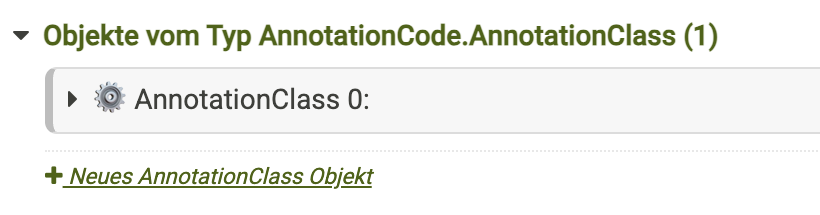
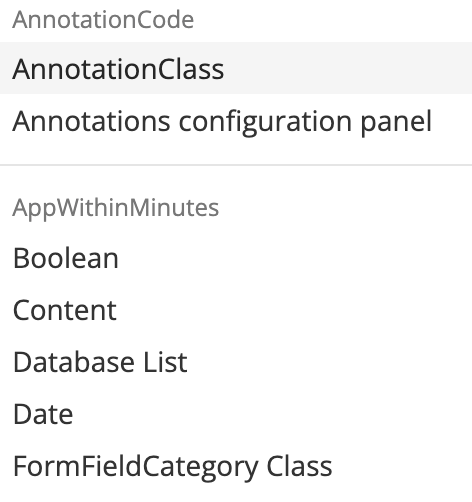
I guess from a consistency point of view, it makes sense to keep the pretty name as a default for each object (and the ā€œreal nameā€ as a hint), since that’s the way it’s being presented on the select box to add a new one. I don’t think that’s possible to make with CSS alone, but I’d be +1 to change it in the appropriate piece of code responsible for this page.

Not only that, but I would even include some sort of categorization like we have on the select itself.

The icon is a tricky subject, you’d need an icon for each item, otherwise its purpose is lost. @CharpentierLucas do you know if extensions can add new objects types? That would make things even more complicated. For ease of maintenance, I’d drop the icon.

@CycleSEC I guess in general, to have this solution scale properly, would be to link as much as possible the CSS values to theme variables. Like colors, font size, border radius values, etc.

Some documentation I found regarding this subject. @CharpentierLucas might know of additional ones

https://www.xwiki.org/xwiki/bin/view/documentation/xs/dev/flamingo-skin/style-variables/
https://extensions.xwiki.org/xwiki/bin/view/Extension/Icon%20Theme%20Application
https://extensions.xwiki.org/xwiki/bin/view/Extension/Color%20Theme%20Application

Yup, you can create your own object type with the class editor or AWM, it’s a strong point of XWiki.

From what I understand they were just sharing their prototype, if we ever implement this in XS, we should follow our code rules and don’t hard code colors: https://dev.xwiki.org/xwiki/bin/view/Community/CodeStyle/XhtmlCssCodeStyle/#HCSS Outside of XS, using those variables is a bit harder/XWiki specific than hard coding things.
IMO if we decide to implement this, we should just give a color picker in the UI to make it easy for customizations to use this parameter.
Thanks,
Lucas.

1 Like

I guess you’re right. I saw ā€œproposalā€ and went fully into dev mode, lol. @CycleSEC my apologies for that.

Regardless, I really liked the idea and I think we can discuss it further.