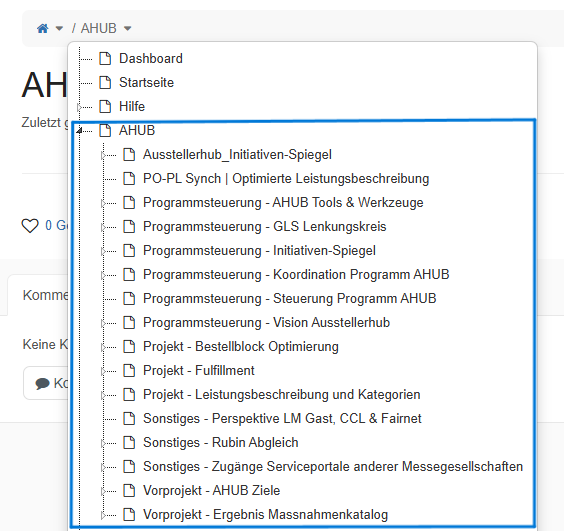
I am not able to manage the access rights for some child pages under a parent page. The only option that I see when clicking on the three dots next to the child-page name is “Manage parent page” (“Übergeordnete Seite verwalten” in the image attached).
I think there was some issue with the Page Index when we migrated the pages and child-pages from simplewiki to XWiki in October 2025. This has happened to all the pages and child-pages that were migrated. However, all the child-pages that were created after the migration are connected correctly to the parent page.
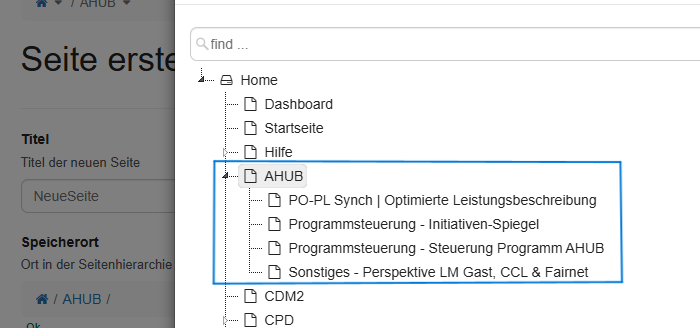
There is an incosistency when viewing the page tree from different areas. E.g., when i see it from the homepage, I see all the child-pages, but when I check it while creating a new page or moving a page, it does not show the child pages that were created before migration.
Now, I need help with solving this issue. Is there any scalable way to reindex all the pages correctly again, because we have several parent pages like this which are affected?
Besides the Manage parent page, there is also another useful feature located in the Edit drowpdown section named Access Rights which allows you to manage the permissions of the current page.
One reason you see the 2 different document trees is that, in the first one, the hierarchy navigation displays all the pages while the second one, the creation menu, will only list the available pages that can be the parent of new pages (non-terminal pages).
Could you confirm that the 4 pages displayed as children of AHUB, in the creation form, are the only ones that are non-terminal pages? See more about Relations between Pages about page types.
Thank you for your reply. I am logged in as the Admin for XWiki and both the views are from same admin user. Unfortunately, I do not see a dropdown under Edit as I am not an advanced user and therefore I cannot create a Terminal Page either, as per my understanding.
Is there a way to check if the pages are Terminal or non-Terminal being a Simple User (Admin)?
However, as an adminshouldn’t I be able to manage the access rights for the pages even if the pages are Terminal pages?
Hi @acotiuga , thank you. So I was able to change my editing rights to ‘Advanced User’ and I checked for the pages. The four pages that I can see in ‘Create Page’ section are non-terminal pages (WebHomein page reference) and the others are Terminal pages (no WebHome in page reference).
So, all the pages that had no child page before the migration have become Terminal pages automatically. Please correct me if I’m wrong!
How can we bulk change them to non-terminal pages again?
Did you use any existing tool or script to perform the migration? Some tools allow configuring how pages are created in the new XWiki structure, which can influence whether pages end up as terminal or non-terminal.
Right now, it’s possible to rename all those terminal pages and convert them into non-terminal ones. The simplest approach is to rename each page manually and un-check the “Rename as terminal” option.
Thank you @acotiuga and @vmassol for your kind support. Luckily we did not have way too many Terminal pages. We were able to uncheck the ‘Termin page’ box for all the affected pages in ~15 minutes. Everything works now!