I hope it is the right place to file an issue (as i am not allowed to create an issue in Jira).
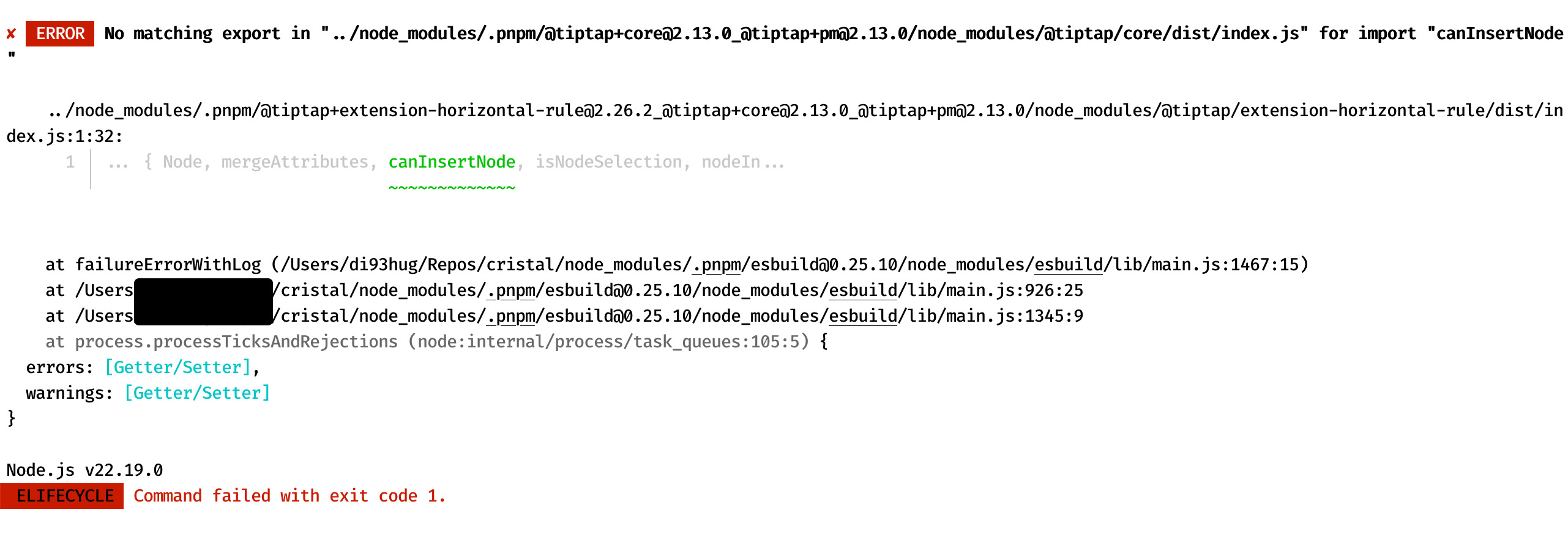
Following the steps to run Cristal locally, currently there is a build error with a sub-sub dependency (tiptap/extension-horizontal-rule).
my workaround is adding these lines to package.json to force using these versions:
Building and running the latest commit in a clean environment, I could not reproduce your issue.
It is a bit weird that your fix requires allowing these package versions, since we should still be using version 2.13.0 of tiptap. I had some issues with a custom deployment in the past where I had to explicitly fix some dependencies of tiptap extensions to version 2.13.0, and you might have something similar here (but this was with regular npm and I could not reproduce it with the Cristal repository itself, are you using the right version of pnpm?)
thanks for going through those steps. Those helped identifying the real issue:
It is on my setting, because my global (home directory) .npmrc contained lockfile=false which ofc ignored the pinned versions and therefore this error occurred.
now everything works fine!
PS: in case someone runs into the same issue, add lockfile=true in the workspace’s .npmrc to explicitly set it in the project and override the global setting.
TLDR;
The main reason is to overcome questions like “when is the right time to update something”.
we are using Angular for our frontend apps and in recent years there were huge changes, which caused fairly old codebases to be refactored in a bigger manner (that is time consuming). That lead to the decision to be always up to date with all dependencies and tackle breaking changes as soon as they occur.
There are some aspects which makes this work for us:
small dependency footprints (we spend a lot of time evaluating packages before integrating them)
just a couple of developers consuming those repositories
updating deps and adjusting code to make them work is first priority to us
does that make sense to you?
PS: Sorry for the confusion in my previous post, I was not meant to ask you to add a .npmrc, but for a person which has the same issue (probably rare case).
Definitely
We solved the issue by using renovate (Mend Renovate Enterprise Edition), leading to a lot of pull requests that we have to handle. But overall that allows us to stay up to date while having control over what is upgraded and when.