Login Problem with LDAP and Sub-Wikis

Hi, i’ve got a problem with the login procedure.

We’re using LDAP for the authentication and it works fine so far.

But it doesn’t work with sub wikis.

I’m aware of the thread SubWiki: Global users getting registered als local users with LDAP - Help / Discuss - XWiki Forum and Use cases of configuration to authenticate users with LDAP (XWiki.org) but this doesn’t provide an solution.

If a user is using the login feature on a sub wiki he’s not logged in to his global account. The process will create/use an local account in the sub wiki. Even if it doesn’t exist. I’ve disabled the login button from our sub wikis.

The most problematic part is not the login form itself. After the session expires, XWiki automatically re-authenticates the user from the remember-me cookies. When this re-authentication happens while browsing a subwiki, the user is logged in as a local subwiki user instead of the existing global LDAP user.

This problem persists since we use xwiki(v16.x) and we are currently at 18.2.1.

The configuration for the sub wiki:
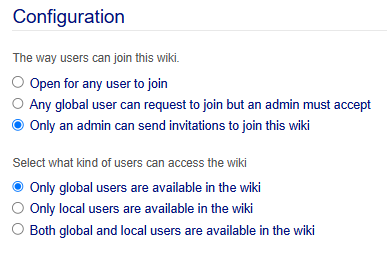
I even tried to install und configure the LDAP plugin in the sub wikis but that resulted also in local sub wiki accounts. currently the ldap plugin is only installed and configured on the main wiki.

Is there any chance that the login from a sub wiki will use the global account and not an local sub wiki account?

Steps to reproduce:

1. Configure LDAP on the main wiki.

2. Create a subwiki configured as:

  • Only global users are available in the wiki

  • Only an admin can send invitations

3. Login as a LDAP user on the main wiki.

4. Add this global user to the subwiki.

5. Logout.

6. Open the subwiki directly.

7. Login from the subwiki login form.

Expected:

The existing global LDAP user should be authenticated and used.

Actual:

A local user is created/used in the subwiki. Like /xwiki/wiki/public/view/XWiki/kbielecke and not the expected path /xwiki/bin/view/XWiki/kbielecke

So, i guess, that’s “works as designed”?

Hi, this is what I’ve done so far:

  1. Created groups/sections in xWiki on the domain
  2. Added users to the groups on the domain
  3. Added users to the groups in xWiki after they synced
  4. Since I’m using Caddy, I added a rule:

wiki.domain.ru {

@subwikiLoginsubwikiLogin {
path_regexp subLogin /wiki/[^/]+/login/.*
}
redir @subwikiLogin /bin/view/Main/ 302

reverse_proxy 192.168.0.166:8080
}

  1. Set the default sync timeout to 21600 seconds in the xWiki.cfg configuration file

Ok. I’ve created an empty login.vm to get rid of the login-button entirely on subwikis. But the remember-me-cookie is the main problem. If the reload(expired session) happens on a subwiki-page rather than on a mainwiki-page, it will use a local subwiki-user. but since there are no local users in subwikis it ends up without permissions.

Does your solution works when the session is expired and the reload happens on a subwiki?

When the session ends, that is, when synchronization with the domain occurs, the “theme” disappears, that is, the broken interface, but when you go to the main page, there is no access at all. This may be related to rights, as I suggested.

You have to reload the main wiki after the session expires. That will use the correct user with rights to refresh the session cookie. I have the expiring of sessions set to 8 hours for convenience. It’s not really an rights problem, it’s the use of an false user when the refresh happens cause subwikis can’t handle global users as it seems. They will allways fall back to an local users which won’t have any any rights. For the “disappearing theme” you should set the rights in the theme so non-logged-in-users can use it. Administration→Themes→Customize Theme→Manage parent page there you can set the rights.

I have a 24-hour sync with the domain.
I had rights to the Themes, but not the parent ones. Thanks for the correction!

So, if I understand correctly, you’re suggesting restarting the wiki container every 8 hours?

No, not restart the container.

My users where logged out every 30 minutes, so i set the session config for my tomcat from 30 to 480 so an logout occures every 8 hours and won’t interrupt the work every 30 minutes. The standard config for tomcat is 30 minutes. Just adjust the session config for your webserver to an length that doesn’t interrupt the users while they’re working with the wiki.

<session-config>
    <session-timeout>480</session-timeout>
</session-config>

So every day they have to login, that’s easier to unterstand from a users point of view. They have to login from the main wiki instance to use the subwikis. maybe 480 isn’t enough but i will see how it turns out.