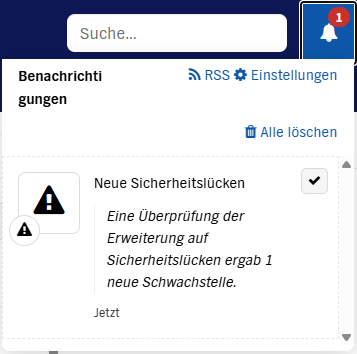
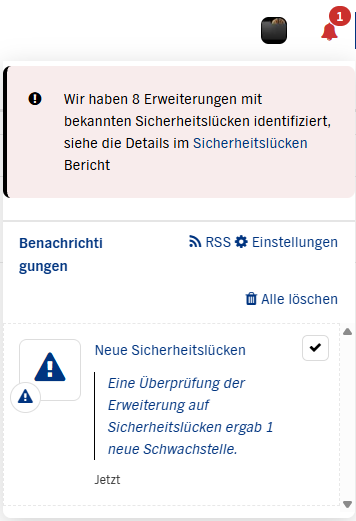
On top there is a red warning with 8 mentioned issues. (I guess there where 7 more notifications in the last time I wiped.) This red warning has a link to follow. But when i follow I see this:
1. Why is there no red box with a link in the subwiki?
The red banner and the “Security Vulnerabilities” administration section are UI elements provided by the Security Vulnerabilities Application, and they display only in the wikis where this application is installed. In your farm it is installed on the main wiki only (it is not bundled with XWiki Standard, it’s a separate install). The notification is a different mechanism: the security scan runs on the main wiki, indexes the extensions of the whole farm and notifies the global admins, and the notification bell shows your notifications in every wiki. So receiving the notification in a subwiki is expected, but the banner is not there. If you want it there too, install the application on the subwiki (or on the whole farm) with the Extension Manager.
2. Why is there no link in the notification itself?
The notification template only displays a text summary (“a vulnerability analysis revealed N new vulnerabilities”). Adding a link to the Security Vulnerabilities report could make sense, feel free to create an improvement issue in Jira if you think this is interesting.
See also the related XWIKI-21932.
3. Why can’t I see any extension vulnerability in the main wiki’s admin section?
The section contains two tabs, right above the list:
Extension Vulnerabilities (the tab you land on): extensions installed through the Extension Manager,
Environment Vulnerabilities: extensions that cannot be upgraded through the Extension Manager.
The count in the red banner (“We have identified 8 extensions…”) covers both tabs, and the “8” is the number of extensions with known vulnerabilities, not the number of pending notifications. My bet is that your 8 extensions are all listed in the Environment Vulnerabilities tab.
Another improvement idea would be to display a count in the title of each tab and/or to automatically switch to the second tab if the first one is empty.
Please let me know if the second tab is empty too as it would be the sign of another issues.
Environment Vulnerabilities tab shows 12 entries. I guess 8 of them are regarding extension too or only to them?
That’s a bit confusing. So Extension Vulns are those I can fix myself with an update of the extension and Environment Vulns are including dependencies extensions need that couldn’t be fixed with an extension update but by updating xwiki?
Then I guess I would give both tabs a clearer label. Are there translation keys for both labels existing I could overwrite?
Extension Vulnerabilities: extensions installed with the Extension Manager. They can be fixed by upgrading the extension itself. One nuance: when the extension is installed only as a dependency of another extension, the advice is to upgrade the extension that requires it.
Environment Vulnerabilities: extensions that cannot be upgraded from the Extension Manager because they are loaded by the runtime: the ones bundled with XWiki itself (i.e., an XWiki xwiki upgrade might fix the issue) and the ones provided by the environment, e.g. the servlet engine or the container (i.e., a servlet engine upgrade might fix the issue).
Regarding the counts: the banner counts extensions across both tabs, and your Extension Vulnerabilities tab is empty, so the 8 counted extensions are all among your 12 Environment Vulnerabilities entries. The 4 remaining entries only have vulnerabilities that we reviewed as safe (false positives for XWiki): the tab lists everything the scan found so that you can see those reviews (they are displayed when clicking on the CVE links), while the banner excludes the extensions whose vulnerabilities have all been reviewed as safe.
I agree the labels could be clearer, together with the per-tab count improvement I mentioned in my previous message. Unfortunately there are no translation keys for these two labels: they are hardcoded in the XWiki.Extension.Security.Code.Admin page that provides this administration section, so they cannot be overwritten through translations. You can edit that page to relabel the tabs, but the modification will be lost on the next upgrade of the application. I would recommend creating a bug issue in Jira (project XWiki, component Extension - Security) so that we replace them with proper translation keys.
Note that we have several other improvements we’d like to do since a while to make it easy to distinguish between: false positive, issues that can be fixed by upgrading in the EM, issues that can only be fixed by upgrading XWiki, and issues that have currently now available upgrade.
I can see the tiny buttons (showing notes regarding xwiki) next to those safe CVE links. When I count them the result is 4: so the remaining safe considered ones. Is this the marker for safe issues or is there another one I could check?
Or the other way around: could there be a button with xwiki notes but this isn’t a safe issue?
The button does not mark safe issues. It marks reviewed issues: it shows up as soon as at least one review exists for the CVE, whatever its conclusion (i.e., safe/unsafe).
A CVE can have a button and still not be safe. In that case the reviews dialog starts with a red error box holding the “unsafe” review(s), followed by the “safe” ones, if any.
The marker for safe CVEs is the display itself:
the non-safe CVEs of an entry are listed first, in normal size,
the safe ones come last, in a smaller font.
This is another place where the UI could be clearer, e.g. with an explicit “safe” label or a column for the review status.