Real-time collaboration in XWiki pages

Hi, is there a possibility for different users to edit pages collaboratively in real-time? - like in MS-Word or MIRO.

Currently, if one user is editing a page, another user cannot edit, unless by force editing. And there is no way for any of the users to see if another user is also editing the same page.

Yes and it’s the default since quite a while now.

What version of XWiki are you using?

I’m currently at 17.10.4

Is this functionality planned for future releases? because that would be really cools for our teams who work collaboratively on XWiki very often.

I said above:

Yes and it’s the default since quite a while now.

It exists since XWiki 13.9RC1 and is the default since 16.9.0 (https://www.xwiki.org/xwiki/bin/view/ReleaseNotes/Data/XWiki/16.9.0RC1/Entry001/)

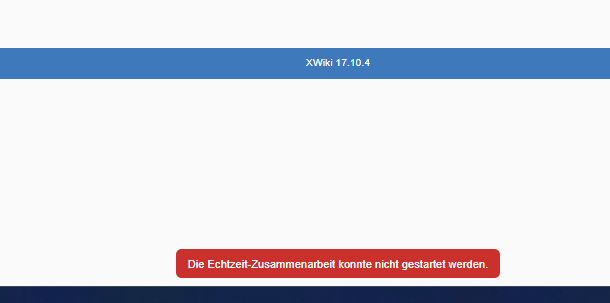
Thank you @vmassol :slight_smile: As mentioned in this link: https://extensions.xwiki.org/xwiki/bin/view/Extension/Realtime%20WYSIWYG%20Editor/, I unchecked the “xwiki-realtime” plugin from the list of "Disabled Plugins"under ‘CKEditor’ section in WYSIWYG Editor administration section. And i get the following warning message - ‘Realtime collaboration could not be started’. Could you please help with that? Thank you!

You’re probably referring to https://extensions.xwiki.org/xwiki/bin/view/Extension/Realtime%20WYSIWYG%20Editor/#HEnabling2FDisabling

And it seems you’ve upgraded from an old XWiki version if you had the xwiki-realtime plugin listed.

I don’t know what’s the problem. Maybe your instance has not been upgraded correctly in the past. You could check if you have local customizations vs the official XS flavor, using https://extensions.xwiki.org/xwiki/bin/view/Extension/Extension%20Manager%20Application#HChanges

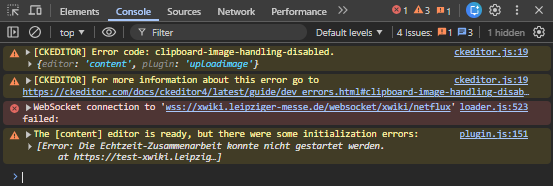
Maybe paste the javascript console log to help figure out the problem?

Ping @mflorea in case he has some idea.

Realtime editing uses websockets. Maybe your server isn’t configured in a way to allow this?

We definitely had error messages in the developer console while realtime editing wasn’t working in our instance. Just have a look.

please check your dev console log (

  1. ctrl + shift + j
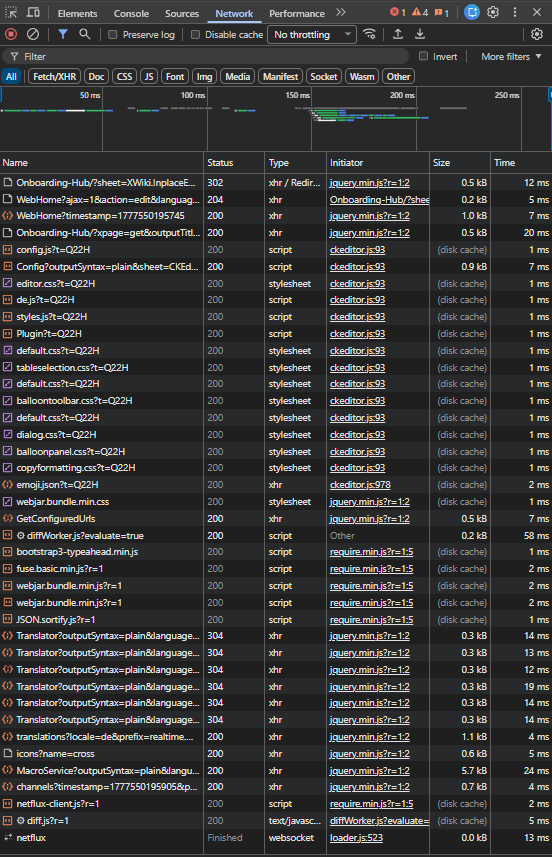
  2. Open the network tab at the top
  3. On the xwiki page start an edit ( basically make the ‘zusammenarbeit konnte nicht gestartet werden’ error show again) .. if the network tab shows an ‘wss socket error’ then you probably need to look at your socket access

The fact it shows the error is a ‘good’ sign though.. atleaswt its attempting to start the real time session!

Hi @Wardenburg , @vmassol and @Simpel , here is the screenshot of the dev console logs (network)

There is however an error message in the ‘console’ window.

Hi @anegi , that error (and the netflux entry in networK) is exactly what facilitates the real time websocket (wss) conmnection.

I ran into something similar recently, and in my case it turned out not to be XWiki itself but the network/proxy layer in front of it.

A couple of things you might want to double-check:

1. WebSocket endpoint accessibility

Realtime editing depends on the Netflux WebSocket endpoint:

/xwiki/websocket/xwiki/netflux

If that endpoint isn’t reachable from the browser, realtime won’t work at all.

From the docs:

Realtime editing uses WebSockets… make sure the proxy forwards /xwiki/websocket/xwiki/netflux correctly (extensions.xwiki.org)

Try hitting it manually (with upgrade headers or via browser devtools). If you get 404/400 or no upgrade → that’s the problem.

2. Reverse proxy (nginx / haproxy / etc.)

If you have anything in front of Tomcat:

  • You must forward WebSocket upgrade headers

  • And preserve the protocol (ws / wss)

Typical nginx requirements:

  • proxy_http_version 1.1

  • Upgrade + Connection headers

  • No forced HTTP downgrade

A common failure mode:

  • proxy forwards everything as http://

  • websocket upgrade never happens

Which results in:

“Connecting to the collaborative session…” forever

3. Port / firewall

Depending on your setup:

  • Default WebSocket port is often 8093 (older setups / separate service) (extensions.xwiki.org)

  • Or it runs via the main app (Tomcat 8080)

Make sure:

  • Port is open

  • Not blocked by firewall / security groups

  • Actually reachable externally

TL;DR

In most cases like yours it’s one of these:

  • WebSocket path not forwarded

  • Wrong protocol mapping (http instead of ws)

  • Port/firewall blocking

3 Likes