Hi,
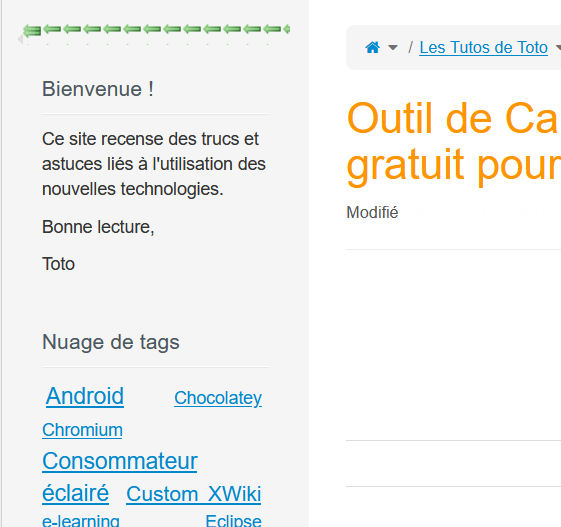
At the top of the panels of my Wiki hosted in the community farm (left and right), I see strange green arrows => see screenshot attached
I took the liberty to do some cleanup in standard pages (your wiki had some strange “customizations” which actually looked more like pages that were imported from an old XAR), but it apparently did not help.
No idea where those arrows could be coming from. I don’t have that on my own wiki also hosted on myxwiki.org at least.
It seems to be injected right above the left and right panels, but it’s not listed as panel. Maybe some UI extension (there seems to be platform.panels.leftPanels and platform.panels.rightPanels for that).
Any idea what changed before you got these ? Was it right after the upgrade to XWiki 17.6.0 (5 days ago) or older ?
Actually, I found it: it’s caused by the https://extensions.xwiki.org/xwiki/bin/view/Extension/Show%20Hide%20Panels%20Application extension that you installed (and more precisely the page https://tutos.myxwiki.org/xwiki/bin/view/XWiki/PanelsShowHide which job was apparently to inject that arrow icon, above panels). I assumed because something changed in the structure of the panels.
But my understanding is that you don’t need that extension anymore, since hiding panels is a native feature now. So I would suggest to simply uninstall it.
In the doc I see:
Currently, this extension works only with standard column panels and a Colibri skin
ie it seems to say it doesn’t work on Flamingo.
I assumed @xrichard would have noticed it a while ago if it really did not work with Flamingo 
Edit: actually it seems it still works, it’s just not displayed very well (but gettings all those arrows was apparently expected, just not on two lines).
@tmortagne @vmassol thanks for your answers => problem solved by uninstalling the old extension https://extensions.xwiki.org/xwiki/bin/view/Extension/Show%20Hide%20Panels%20Application
Thanks again for the quick and efficient answers => I close this topic.