I tend to prefer option 1.
In terms of implementation, it also means to stop relying on code generation, which is often a good thing.
It would also add more value to LiveData itself.
Then, we need to be cautious if we go that direction because AWM is known to be an important feature despite its limitations and a very convincing point for the adoption of XWiki.
Proposal 1 is the ideal as it proposes a “spreadshet like” data structuring experience.
However, I don’t agree with the fact that “AWMs should be created from any page”.
The fact that competitors are mixing and matching data types - plain text with structured, one structure with another structure, that structures are so seamless is, indeed, “cool” at demo level but:
it can easily get very rich / bloated / complex / hairy. The whole mixing is easy to handle when you’re the one creating it (therefore the bias of the demo / test), but when you need to consume some that has been created by someone else, the seamlessness removes explicit and it can hinder understanding of the data, impact clarity. Or maybe I am just too old. However, some of our users have my age (or more).
honestly, I’m not that sure that this is done so often (outside of a demo / test usecase) that it’s really worth the cost of doing this and the complexity of the resulting UI.
Proposal 1 obviously doesn’t have the same cost as proposal 2.
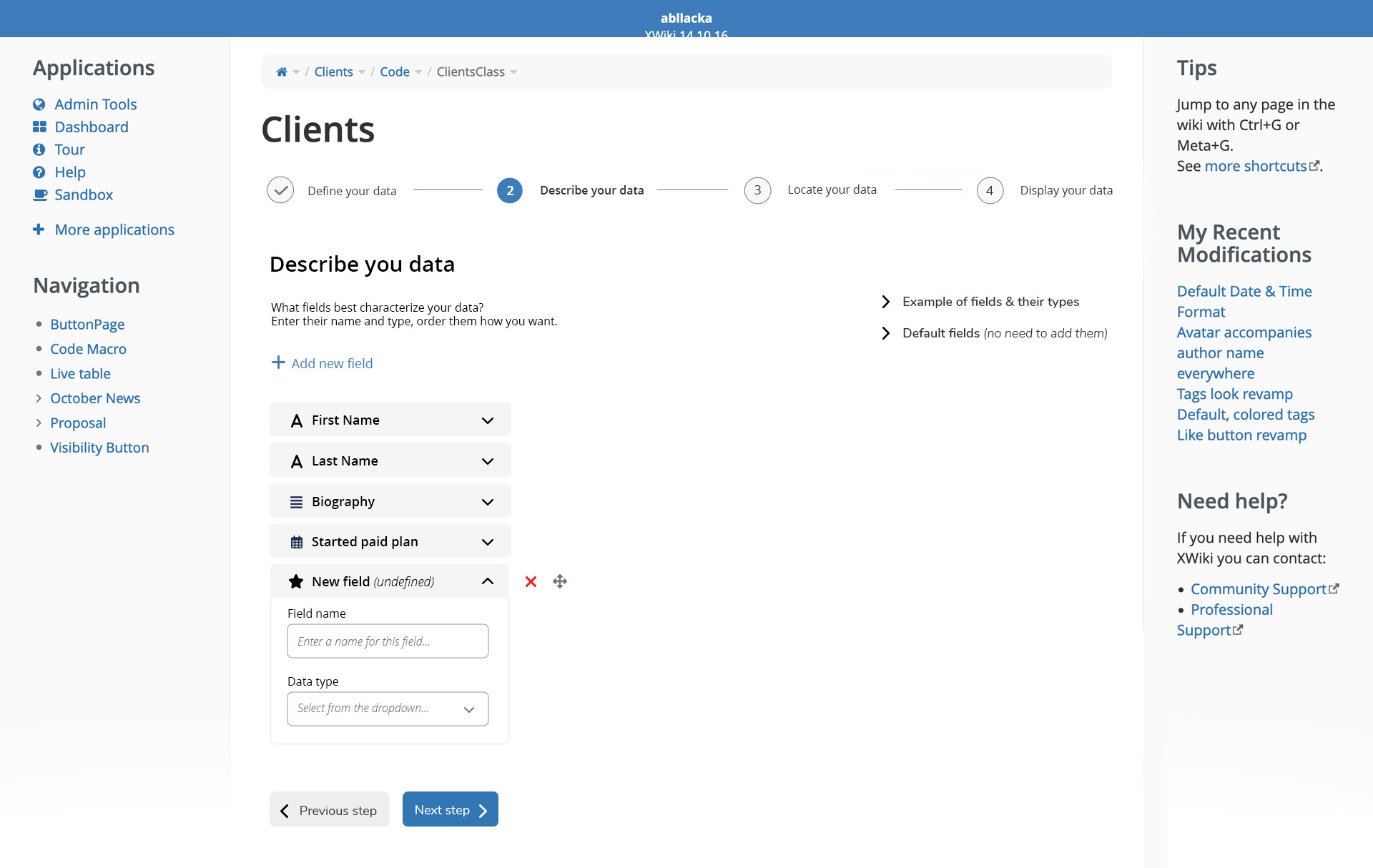
Now, about proposal number 2, I’m not sure I understand what are the specific changes from your proposal in terms of ease of use / UX (besides the design things). You’ll need to explain them to me, probably, and describe how each of them impacts the usability and why. Or maybe just describe the problems that you see in the current wizard, screen by screen?
Also, your images for the wizard are missing access to the configuration of a field, which is actually very important for some fields (the date format is configured in there, the fact that a user picker is single select or multiselect, etc.)
I agree. I’m not sure how well this UI would scale when creating complex applications with custom/complex fields. In most cases applications are not created complex, but if we replace the app wizard it will also influence the edition process of apps.
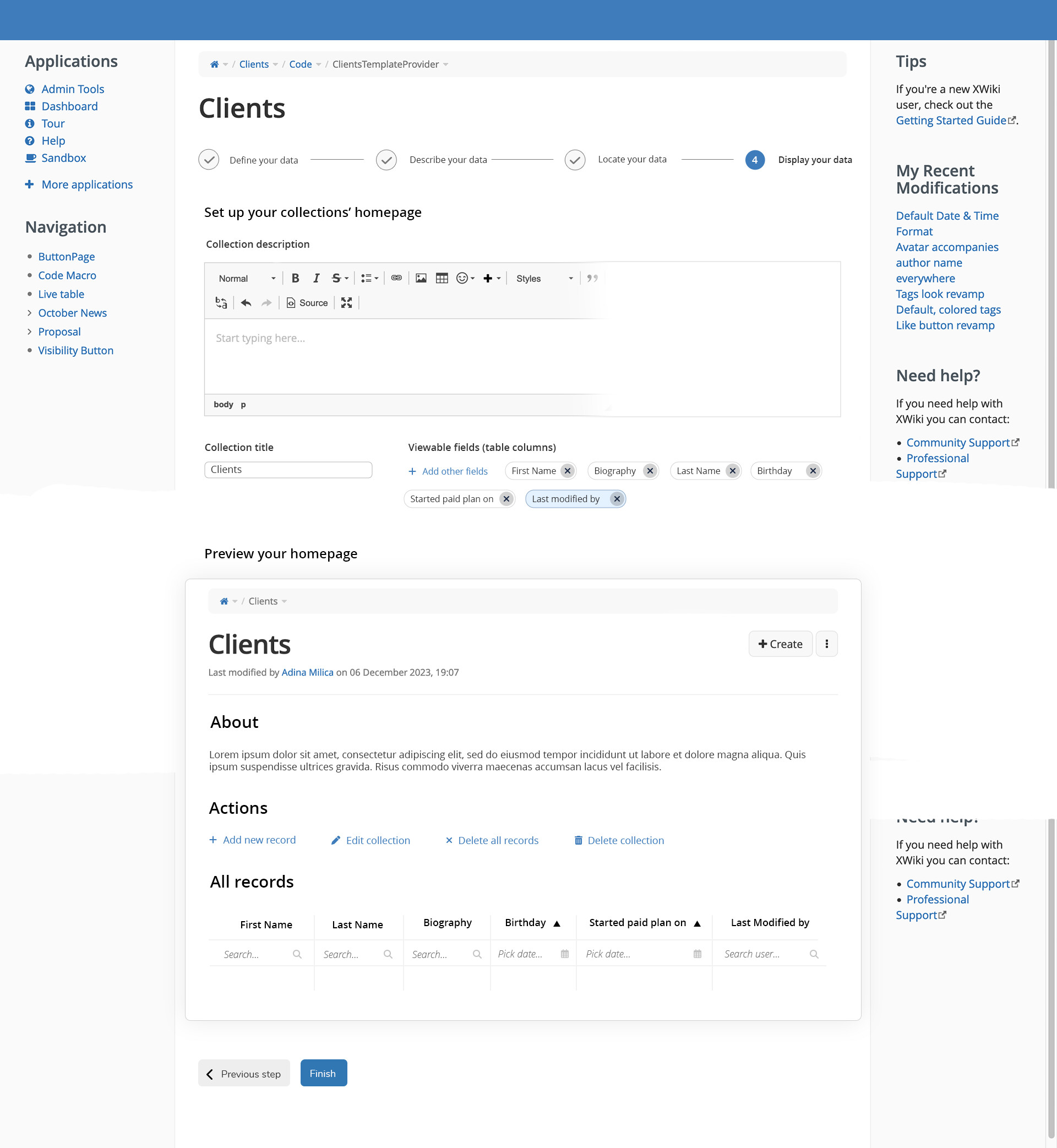
The edition of apps is difficult enough, we don’t need to display the actual entries in the table IMO, there’s enough information.
Proposal 1
How many entries would be displayed in the proposal 1?
The idea of having the more advanced parts of the application creation process in a Additional Configuration optional section is good and I believe it can be transposed in proposal 2 if we’re smart about it.
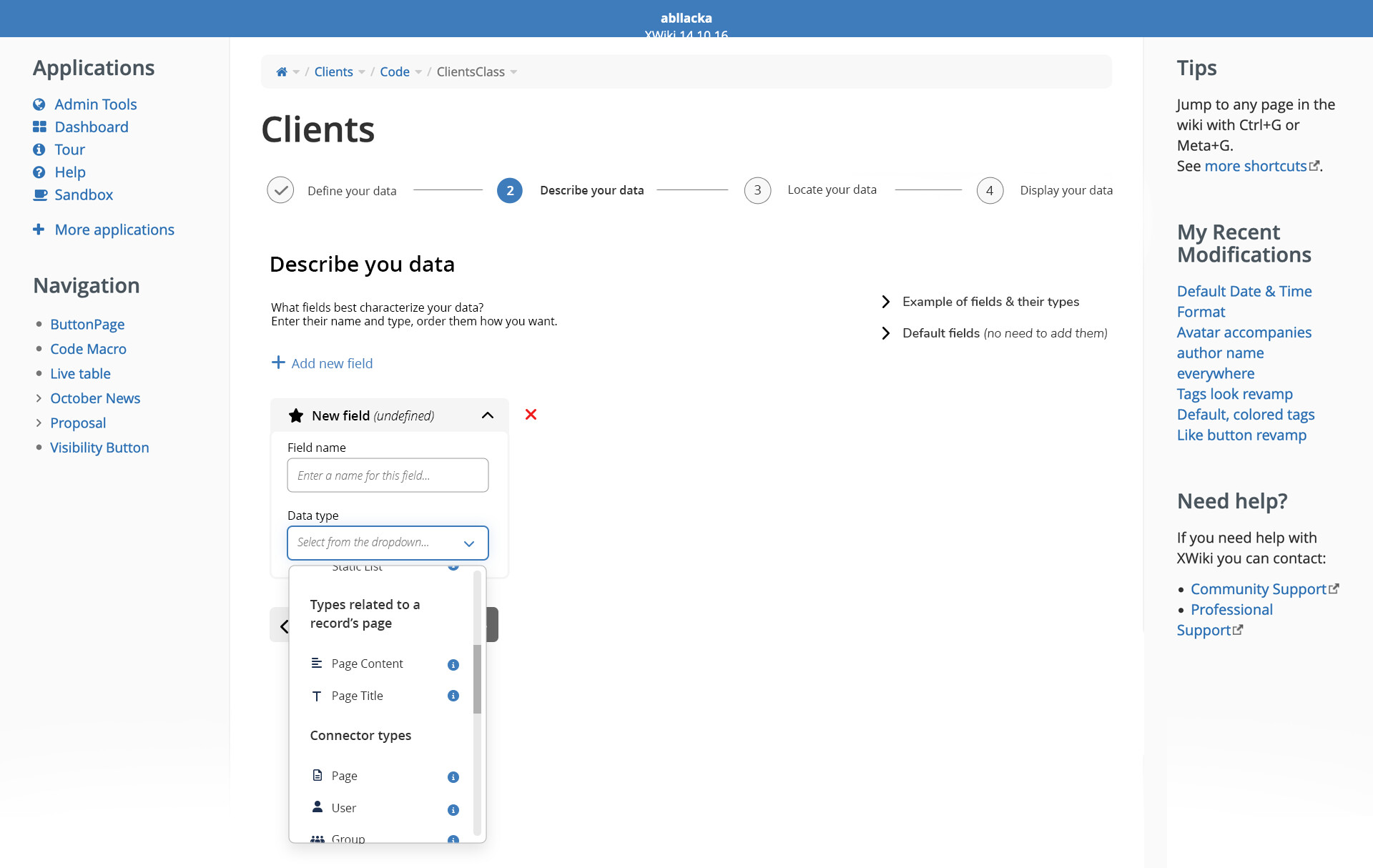
I don’t like having nested dropdowns. It’s fairly difficult to use IMO, and easily an accessibility bareer if not done very consciously. E.g. people who experience tremors might have the dropdown close on them unexpectedly too often to actually use a mouse here…
Overall IMO it’s way too dense in information. This might look better at first, but as soon as the user starts actually using it it becomes a pain.
Proposal 2
As mentionned above, I think skipping steps 3 and 4 when creating an app can be interesting. When editing, no steps would be skipped. This would be done by replacing the “Next Step” button with a “Finish” and “Advanced configuration” buttons in step 2. The “Finish” button has the primary color to accentuate it, but the “Advanced configuration” is still here for users that understand what they want well and want to do it all in one go.
Why is this info hidden when reaching the step? I’m not a fan of the layout of these blocks. When they are collapsed they look out of place, and when they are expanded they steal all the focus with color. Maybe we should have this info on a help page and have a link in the step explanation?
Same comment as above, the details about data types can be difficult to reach and keep open reliably for some users. How would this dropdown look? What information would it contain?
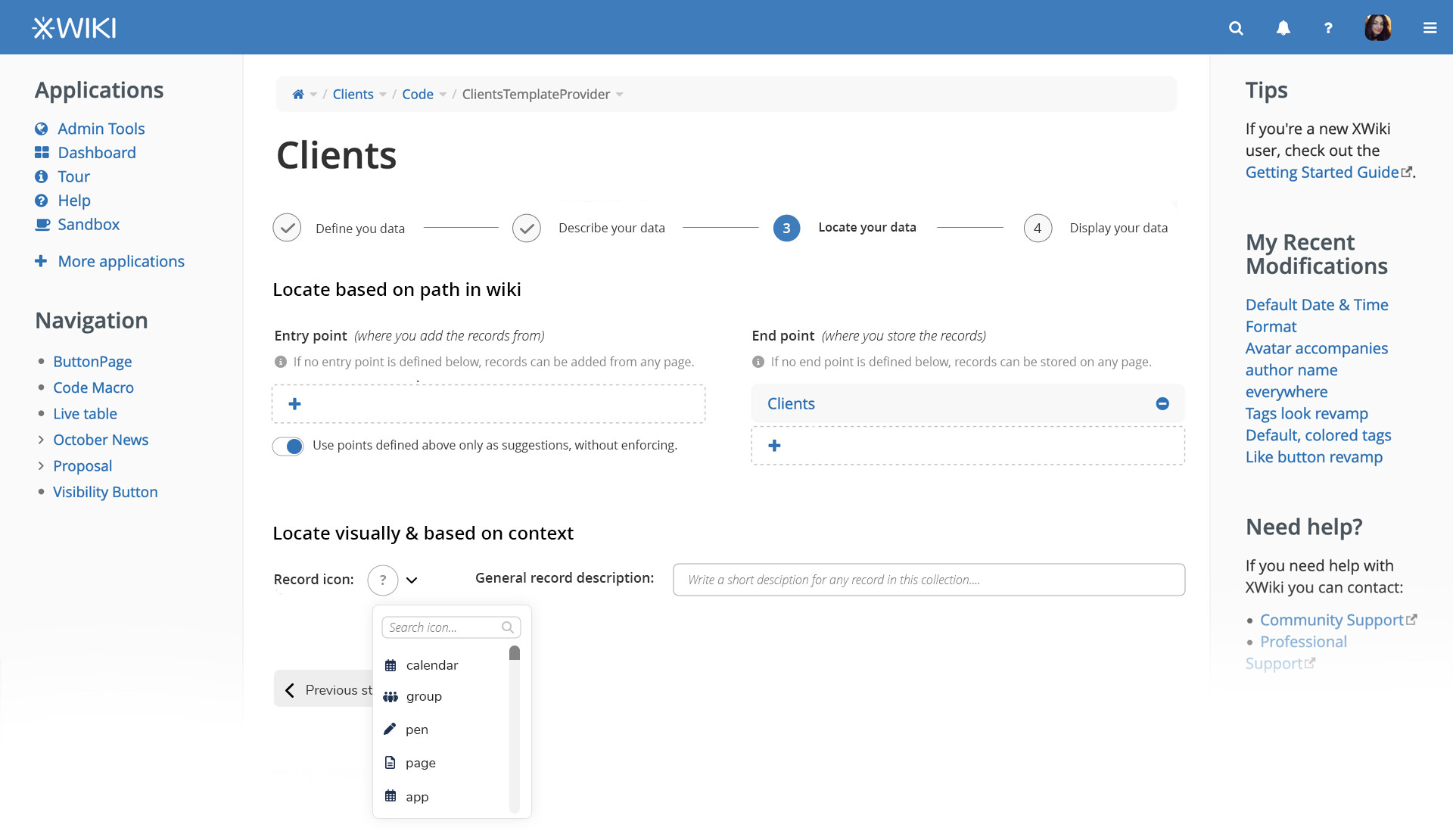
Note that this contains a change of the looks for the icon picker. In this picker, the user can currently select the icon theme. Is that a feature that we want to disable here?
Is it part of the proposal to overwrite what was proposed here? Should we drop this part from the current proposal or drop the previous decision?
Overall:
+1 for option 2, IMO if we improve things we can have a nicer UX than anything done with option 1. In addition, it’ll also probably require less time spent on it and introduce less bugs…
+0 for option 1, we need to be extra careful with UX when implementing option 1 if it’s picked, to make sure we’re not regressing.
Thank you for proposing all these changes!
Even though I made a lot of comments, I think it looks great overall and I hope we can get improvements to the AWM UX soon
Firstly, thank you for the proposal regarding AWM. I agree that it needs improvements. However, at this point I can’t vote which suggestion I prefer the most, because I still have a question.
In your proposal, do you take into account the current limitation where the AWM interface does not provide a “go back” option? Right now, if the user accidentally names a property incorrectly and it doesn’t comply with AWM rules, AWM will redirect user to this window
Adina has transitioned to other projects within XWiki SAS, and I’ll be picking up the discussion on this topic. Thanks to @amilica for the proposals (and let me know if you have objections to anything that I propose here ).
It seems there’s general alignment around option 1, moving entirely to an improved LiveData table. As @CharpentierLucas highlighted, this would introduce a notable shift in the UX paradigm and it comes with some valid challenges.
That said, the proposals here don’t need to be treated as mutually exclusive. They can be combined and rolled out progressively, alongside other ideas that have been discussed in the past.
Based on this, I’d like to propose a possible plan of action, focused on taking these improvements while gradually evolving toward a streamlined approach for app creation and editing.
Plan of action proposal:
Phase 1 - Start by changing LiveTable component with LiveData in the app homepage.
This should bring improvements already by moving away from tech debt.
Phase 2 - Improve the LiveData component:
Allowing the user to create new properties (Adina’s proposal 1) in the app homepage itself
Under the hood, adding columns must trigger the creation of a new property in the AWM.
Questions:
How do we deal with hidden columns? A possibility is to have a “view hidden” entry in LD options.
Moving columns in LD should also change the order of fields in each entry page?
At the end of this phase users should have an immediate UX improvement for day-to-day use of existing AWMs without disrupting existing workflows. But the App creation process remains complex, for now.
Phase 3 (easier) - To improve it further, we can change the current Wizard
Adina’s proposal 2 of this topic, skip all unnecessary steps (3 and 4 like Lucas said). Let users customize these skipped steps when editing the app if they feel the need.
We might need to change a bit of the individual steps still.
OR
Phase 3 (harder/future):
Move away from the Wizard, this would be a new proposal but one idea:
Lower the entry barrier for AWM by starting from the content itself.
Start an App by providing the content structure in a new page (a template?, a new option on the create page?)
This page would have the data type picker somewhere, each data type can be configured directly in the page (similar to step 2 of the current wizard)
When saving the page: ask users about the most basic and required info for the app:
App Name
Icon
Description
Location (with suggestion)
The app homepage would be created automatically with the name, description and LD table for navigating each entry.
Let users change secondary options after save
Entries icon
Entries description
Order/sort/hide columns in LiveData
Phase ? / In parallel?: Further enhance LiveData to give it more view modes
Timeline
Simple List
Charts
Calendar
Gallery/Card improvements
Grouped view in table mode
An now I need your take on this. What do you think of the proposed plan? Any changes you’d like to propose? Or should we stick with only one of the options (Proposal 1 or 2)?
In case we decide to move with both changes on this topic I’ll update the main proposal with this definition and also work more on the steps of the wizard.
The strongest part for me is starting from the content itself. That feels closer to how people naturally think. They usually know what they want to capture before they know how they want to configure an app.
I also like the idea of only asking for the basics when saving, with defaults and the option to refine later. That kind of flow reduces friction a lot and makes the whole experience feel lighter.
To me, the biggest value here is not just speeding things up, but making the first experience less overwhelming.
Would it be like a toggle that would either display, or not, the hidden columns in the LD? I guess that could work. +0 on this one.
I think so, yeah. To me, it would be weird to see a certain column order, then when you go on a page you see a different order for the proprieties.
For everything else in the 2nd phase, +1.
IMO, XWiki should offer some “good enough” defaults, and cut down on the initial wizard as much as possible. This would mean that most users get started with AWM quickly, and users with more advanced use cases would change the options they need to change later.
I’m currently unsure about this approach. +0.
Having the ability to create charts with LD would be really powerful IMO, and it could potentially be useful to AI agents. +1
IMO, XWiki should offer some “good enough” defaults, and cut down on the initial wizard as much as possible. This would mean that most users get started with AWM quickly, and users with more advanced use cases would change the options they need to change later.
Using LiveData to define the data structure and enter data at the same time is nice (for the application creator) but I remember that when AWM was implemented one important use case was to allow users to design and create forms. For this reason the second step, where you define the application structure, tried to be a WYSIWYG form editor. I don’t think you can design the form through LiveData. You can get a default form generated based on the LiveData columns, but that’s not optimal in many cases, since with the table view you want to optimize for the horizontal space while with a (vertical) form layout you don’t have this problem. Then there is also the question whether using a LiveData (excel-like) UI to enter data is best for everyone or for any use case. My feeling is that some users will still prefer a form. Moreover, in some (edge) cases the user entering the data should not see other users’ data. Furthermore, for some complex data structures with relations between properties (e.g. country → city) it might be more complex to implement input validation within the LiveData (for inline editing) than on a classical form.
I’m not convinced that updating the form based on the LiveData is always a good idea. But otherwise I’m fine with phase 1 and 2. For phase 3 I’d like to know what do we do with the form design use case.
Do you think giving the app creator the ability to turn off inline editing would improve this scenario? Other than that, I don’t think we would completely remove the form for view and edit information. Inline editing would be just another option.
Sure. I’m just not convinced that updating the form based on the list of live data columns is always the best option. What makes sense (is optimized) for view (listing) might not be good (optimized) for edit (form). It’s probably fine for most of the cases, but my question is how do we answer a user who asks us to have different order (grouping) of properties (columns) in the form and live data. We can say that they need to customize the app, in which case they lose the ability to edit the app without overwriting the customizations. I just want to make sure we’re OK with this limitation.
I share the concerns of @mflorea to reduce AWM to tabular data, in particular as the Live Data might not display all properties of the form while at the same displaying properties that are not displayed for individual entries because they are already displayed outside the content like the location of the page.
[Edit] Moved part of this message to another, more fitting thread.
I see, I did a quick research with other products (Notion, Affine, Obsidian) and when this type of feature is available, the visibility of fields and its position are completely independent in each view. So I guess we already have a precedent to follow this standard.
If we do the proposal 2, I have feedback regarding the 2nd step:
The relative importance of the buttons “Add new field”, and “Previous step” and “Next step” is confusing, as the user is encouraged to go directly to next step, just below the field config. I’d rather put the previous/next steps buttons on the bottom right of the wizard, and the “Add new field” button directly below the field configuration, with more visibility.
Regarding the phases @tkrieck proposed, I agree moving forward on Phase 1 & 2 is valuable.
For Phase 3, on my end I would go with the proposal 1 to move away from the Wizard, taking into account the concerns of @mflorea and @MichaelHamann regarding forms.
From the looks of it, we seem to have a general agreement on Phases 1 and 2. Note that during this discussion another improvement for LiveData was started with: https://jira.xwiki.org/browse/XWIKI-17627
@amilica What do you think? If you agree, could you please mark this topic as solved? Meanwhile, I’ll go on and update the main proposal.
 Based on the issues identified in this discussion, I’d also want to propose 2 initial proposals. In case you want to dive deep, here is the design page.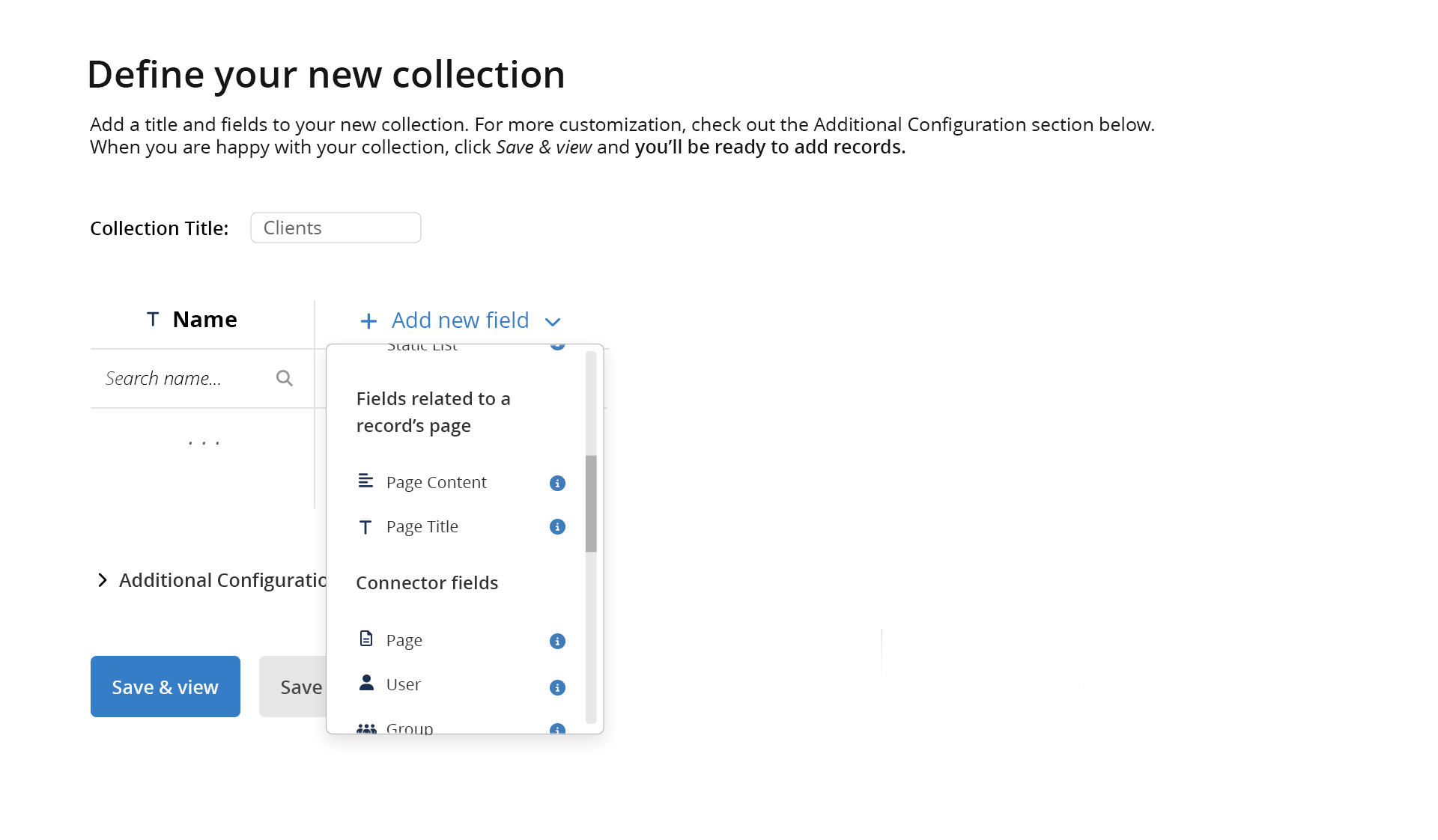
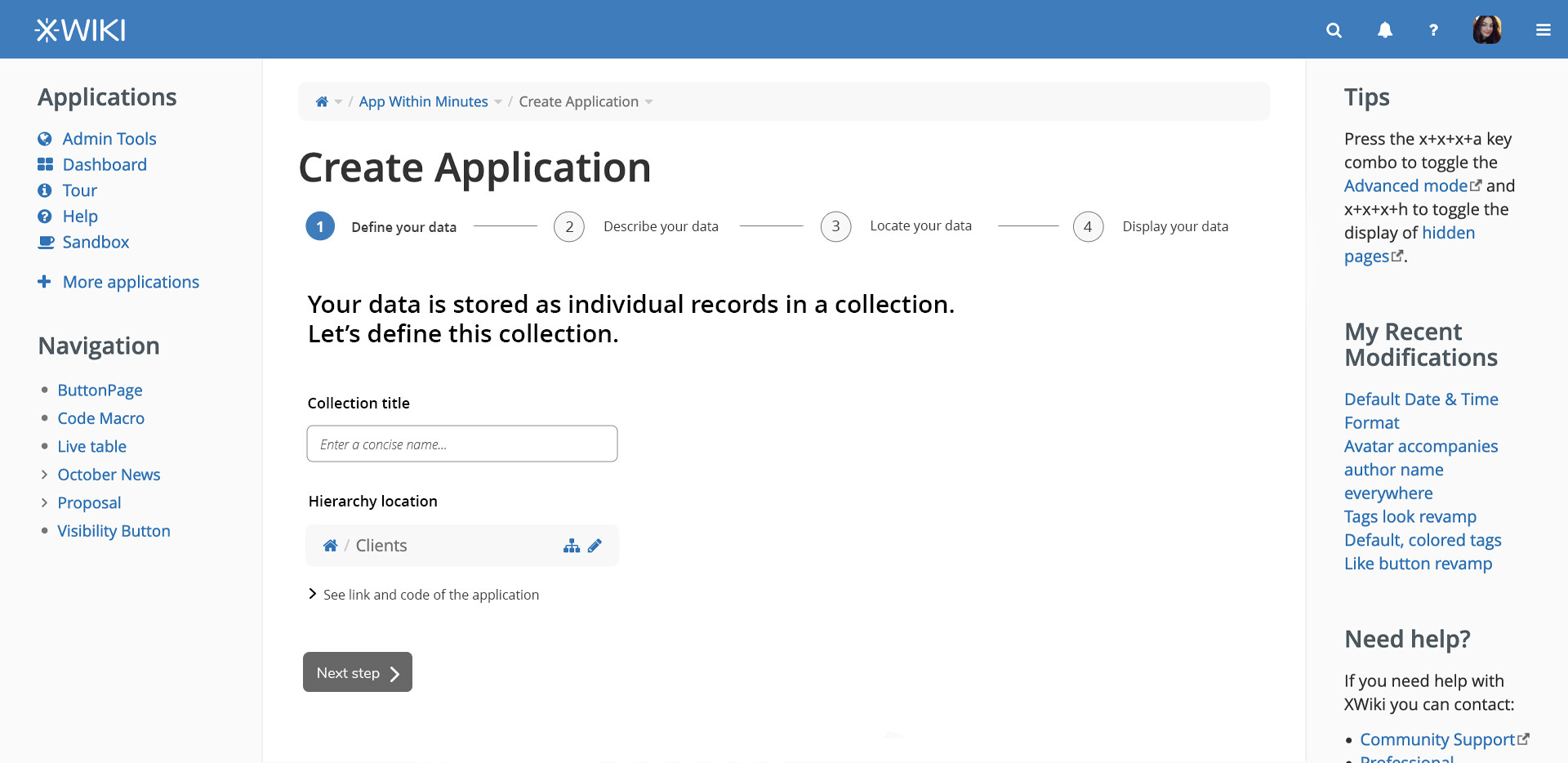
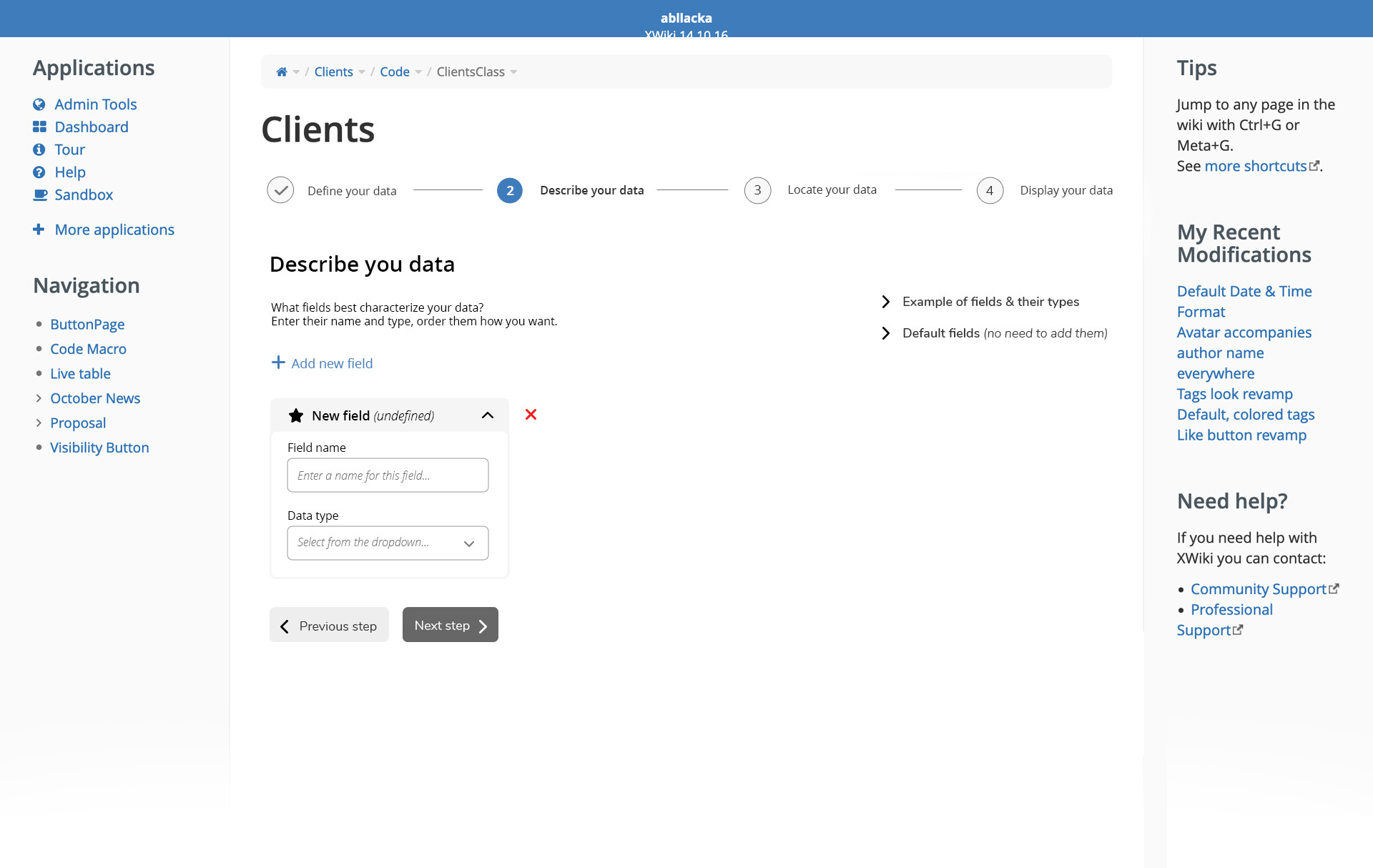
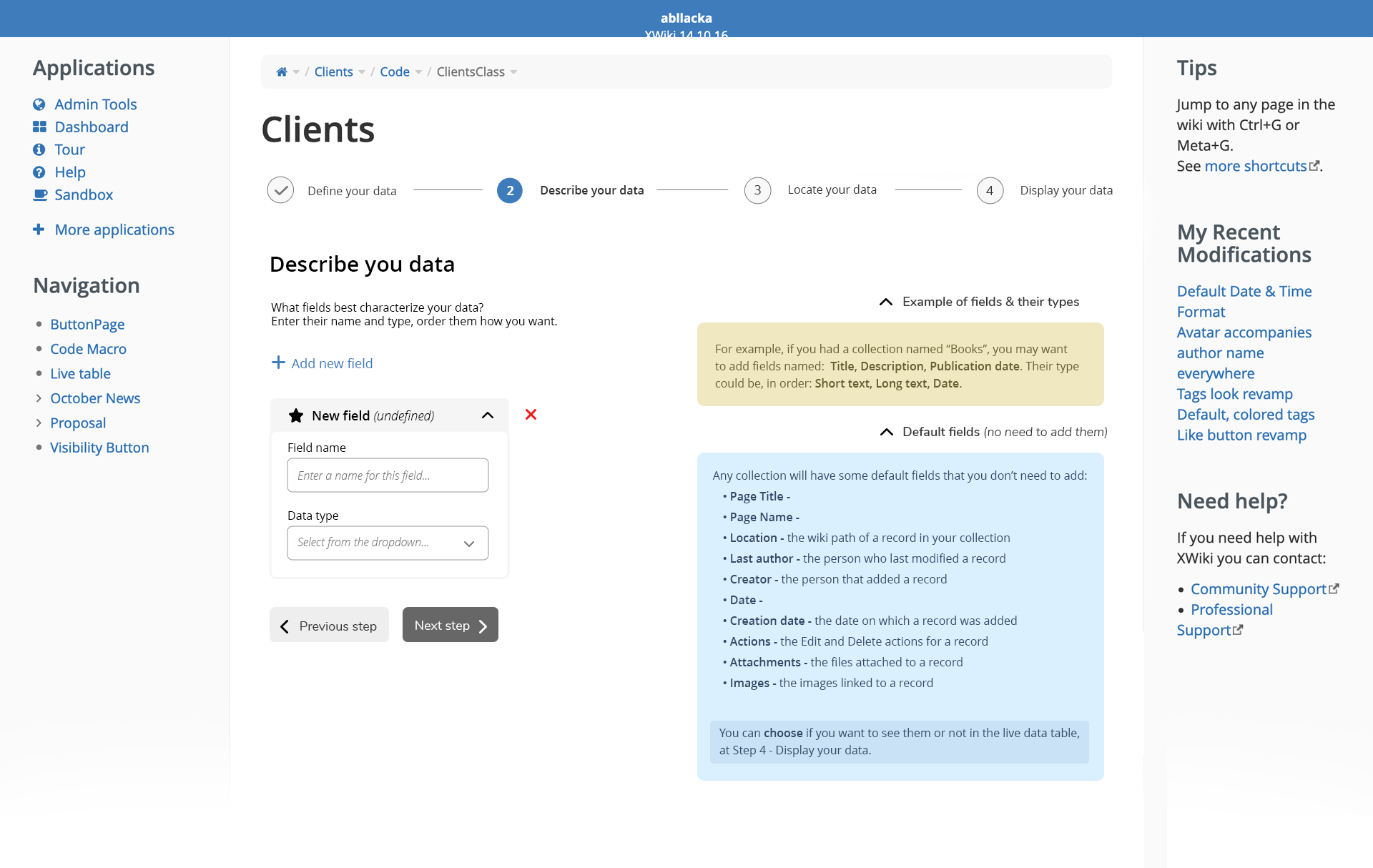

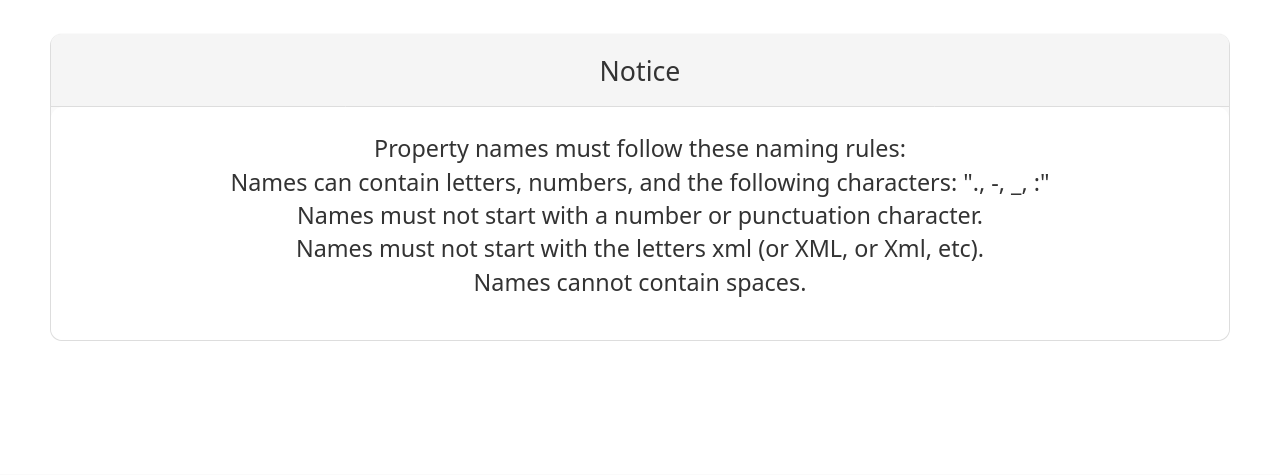
 ).
).