Hey,
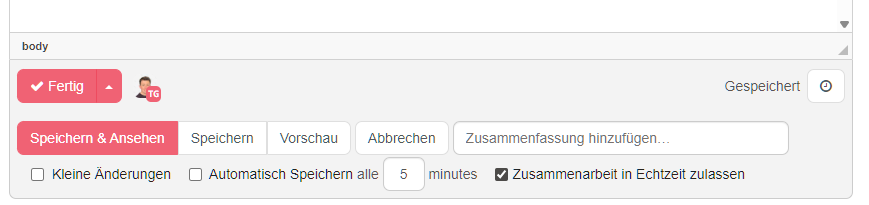
we are looking for a way to get the Change Comment / Summit Field next to the Save Button in WYSIWYG like it is on the “Object” View:

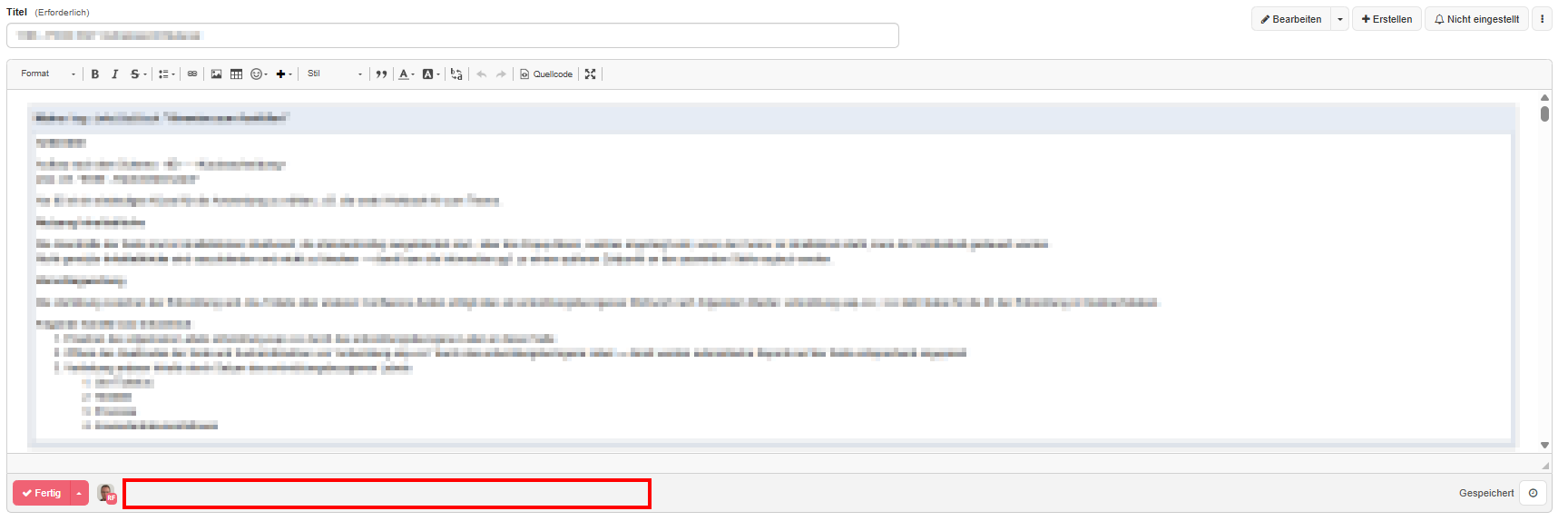
How to achieve this?
Thanks for Helping!
I have a similar requirement so I tried to look into this.
I thought looking into the skin and how the editor is build would be a good starting point. Both editors, WYSIWYG and the object editor, are created using velocity tempates: editwysiwyg.vm and editobject.vm. And both of them use the same editactions.vm template to create the buttons.
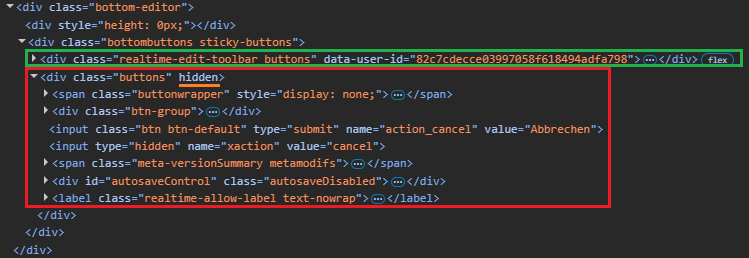
Knowing that, I looked into the DOM and realized that the “classic” buttons, including the comment/summit input field, are already present when using the realtime editor. They are just hidden and another toolbar with buttons for the realtime editor has been added:
If you remove the hidden attribute, you can see that everything is already there. If you enter a summary and leave using the realtime editor “Done” button, it works and you will see your comment in the document history.
Using a breakpoint on attribute modification, I found the JavaScript code that is responsible for hiding the “classic” buttons and adding the realtime editor buttons: toolbar.js#L38
// Replace the old toolbar.
this._oldToolbar = document.querySelector('.bottombuttons.sticky-buttons > .buttons,' + '.cke_maximized > .buttons,' + ' .inplace-editing-buttons.sticky-buttons > .buttons');
(...)
this._oldToolbar.hidden = true;
It would probably be a kind off a “hacky” solution, but maybe you could just make the required elements visible again?
Hi @hiesscher and @grimmksg
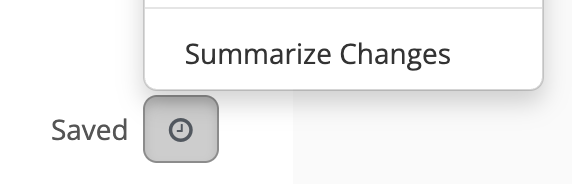
The “Summarize Changes” option has been moved inside the Quick History (clock) icon.
This change was made to simplify the real time editor experience, since the new editor continuously saves content in the background. In most cases, users don’t provide a summary when saving.
That said, I’d really like to understand your workflow better, could you share a bit more about your need to have the Summarize input always visible? Your input would help us make sure the toolbar design supports different ways of working.
You can also follow the discussion about the toolbar revamp here (the topic is marked as solved, but we’re always open to feedback): Realtime Session toolbar
Thanks,
Thiago
Hello @tkrieck and thanks your your input.
We currently have documents in the wiki (policies, product quality, …) that are audited by external users. The responsible departments used to always add a summary/comment when changing anything in these documents back in our confluence wiki for documentation purposes. It was not enforced that you can’t save a document without a summary, but at least the “presence” of the input field right next to the save button reminded the user to enter someting before saving. Thats why they asked if we can achive something similar in XWiki.
I know there is actually a setting to “Require version summary” in the XWiki admin menu. Thats even better than having the input field there, because you can ensure that the user enters something when leaving the editor. However, it looks like that setting only works on a global level. I don’t want to enable it and force everybody to enter a summary on every document. That would be inconvenient, because we have far more documents that don’t need a summary on every change than we have ones that do.
Having that setting on space level would be the perfect solution.
In XWiki, realtime collaboration is enabled by default when editing plain wiki pages with the WYSIWYG editor. Realtime collaboration performs auto-save. Even if the summary input would be visible on the realtime toolbar, you would still get some revisions auto-saved without a summary. Moreover, the autosave might be triggered while you type the summary, in which case a partial summary would be used. This is why we chose to hide the summary input from the realtime toolbar and instead introduce a separate action to “save with summary”.
If the wiki pages you mentioned require a very well-defined history with change summaries, then maybe realtime editing is not suited for them. Currently, there’s no way to disable realtime per space though. There were some discussions about this and the solutions we thought about are:
But neither of them has been implemented yet.
I’d love the “summary” textfield next to “Done” button, too:
&comment=<here goes the suggested summary> URL parameter (which I could have sworn I had read about in the docs but can’t find it anymore, used to work with 15.10.x at least). This does not work anymore with realtime editing.Maybe enforcing summary could be made mandatory only for major edits and background auto-saves could be regarded as minor? When clicking on “Done” you always make a major edit and are forced to summarize?
Regards
@mflorea maybe we could display the summary field next to the Done button when XWiki is configured to force filling out a summary? WDYT?