Hello all,
I’d like to propose the introduction of a new macro dedicated to the custom listing of XObjects by non-technical users.
By custom listing I mean the possibility to decide, for a given XClass:
- The entries to display
- The filtering criteria
- The sorting
By scoping to non-technical users, this means the following constraints:
- Use of non-technical vocabulary
- Everything is achievable using WYSIWYG
- Auto-suggestions for all the relevant fields
- Non-technical error messages
- Available to users with edit rights only
- Available to non-advanced users
In short, the goal is to let anyone add listing in their documents freely. For instance, being able to add a listing of all the meetings a given user was involved in December, sorted by date. For each, only displaying the executive summary and the title (assuming a Meeting XClass exists in the wiki).
This macro would allow picking a XClass, its properties, and sorting and filtering criteria.
The rendering output a Live Data (LD).
The way the XClasses and XObjects were created is out of the scope of this proposal (including AWM, used only as an example). We have other work for this topic:
- (future work) The ability to define the structure of a LD (ultimately impacting the structure of an XClass for the
liveTablesource) - (ongoing) The ability to add entries directly from LD UI (here, a new entry is an XObject in a new page in the case of the
liveTablesource).
Motivation
- Currently, it is difficult for non-technical users to add listings of their structured data from the editor.
- Creating a structure is decently easy with App Withing Minute (AWM). But, from there, adding a list of the data added in an AWM, with custom filtering and sorting, is not easily achievable.
- Users can use the Live Data macro, but its generic nature (e.g., supports several sources) and lack of suggestions and error reporting makes it hard to use.
- User can also use the
documents(pretty name: Pages) macro, but it is limited to pages, and suffer from the same lack of auto-completion support, making it hard to configure for non-technical users - This is especially important in the context of users familiar with Confluence or Notion, where such listings are easily done.
Use cases
- UC1:A non-technical user (e.g., a project manager) can insert a listing of XObject from an XClass they created (e.g., using AWM).
- UC2: An author who does not know XWiki syntax configures that table entirely from the WYSIWYG macro dialog.
- UC3: A reader of the page filters and sorts the table themselves, without editing anything.
- UC4: An author restricts the table to one sub-page, and chooses whether nested pages are displayed too.
UC5: An author wants a plain list of pages with no data type at all. Equivalent to the {{documents}} macro. Already covered by the documents macro- UC6: An author reopens the macro months later to add a column, and finds their existing configuration rather than defaults.
UC7: (optional, probably best covered by a contrib extension) A Confluence migration turns a Page Properties Report into this macro, with the migrator creating the class. Covered by a dedicate extension- UC8: A property is renamed or removed from the class after the macro was configured, and the page still renders.
- UC9: A reader without permission on some of the matching pages sees a table containing only what they may see.
- UC10: A reader with edit rights is able to add entries to the table, and edit existing entries, in-place, if the author allowed it.
Specification
You can see more details of the proposed parameters and how they interact in the design page.
The main scenario to have in mind is:
- The author types
/macroamein the editor (see naming below) - A macro dialog opens
- The author is asked for a XClass (exact vocabulary to be defined)
- The author is asked for properties, sorting and filtering choices
- The author inserts the macro, a Live Data is displayed in the editor, with a visible content
Options
This section will describe a few options that all fulfil the same features, but with variations on the level of support provided to users.
Option 1 - No improvements
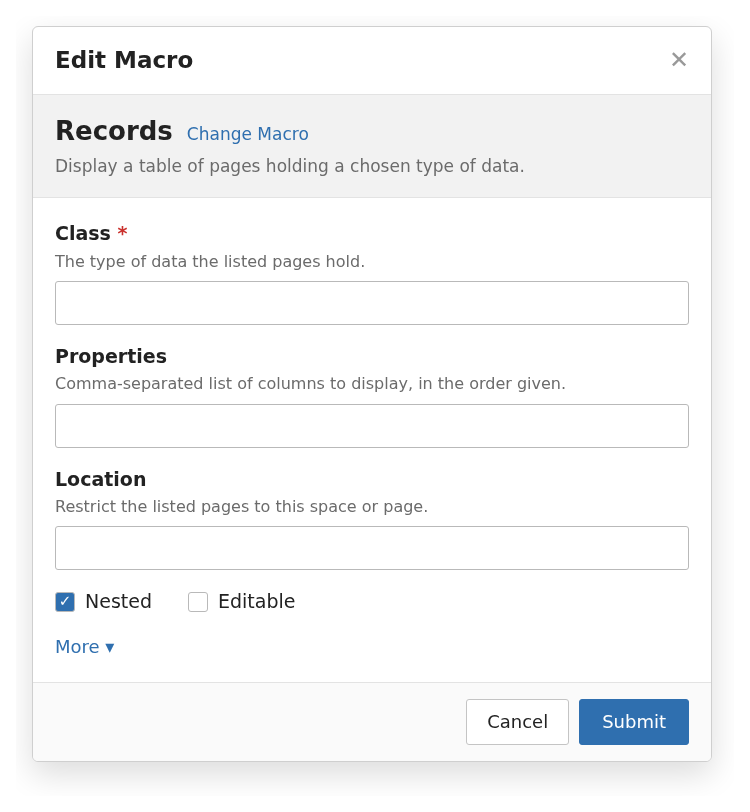
This is basically a rewrite of the Live Data (LD) macro, but with a specialized UI focused on XObjects listing.
No custom displayers, no conditional display of parameters.
With no specialized pickers, everything is free text and the author has to know what to input, and where to copy it from.
Option 1.1: No parameter validation, everything is passed to the LD, LD error messages are presented to the user
Option 1.2: Server side parameters validation
Pros:
- Cheapest
Cons:
- Poor usability
Option 2.1 - With custom displayers
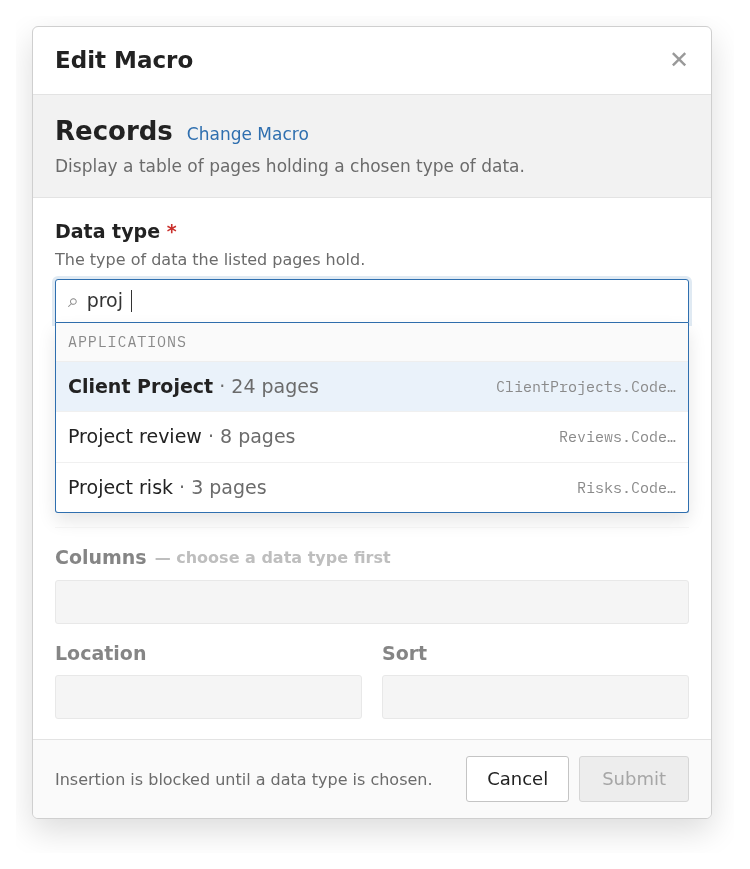
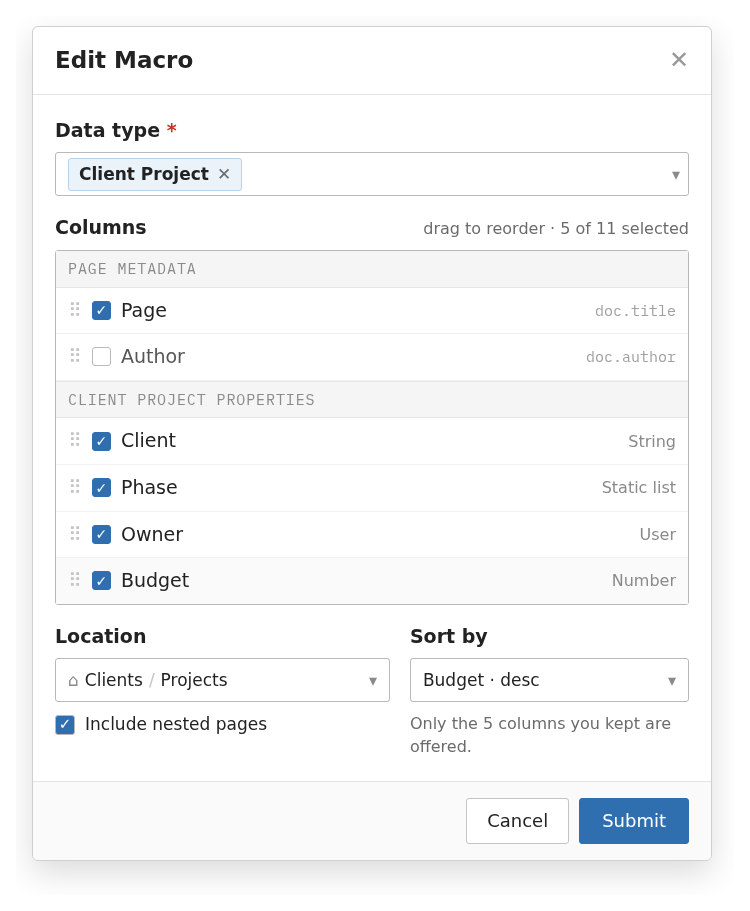
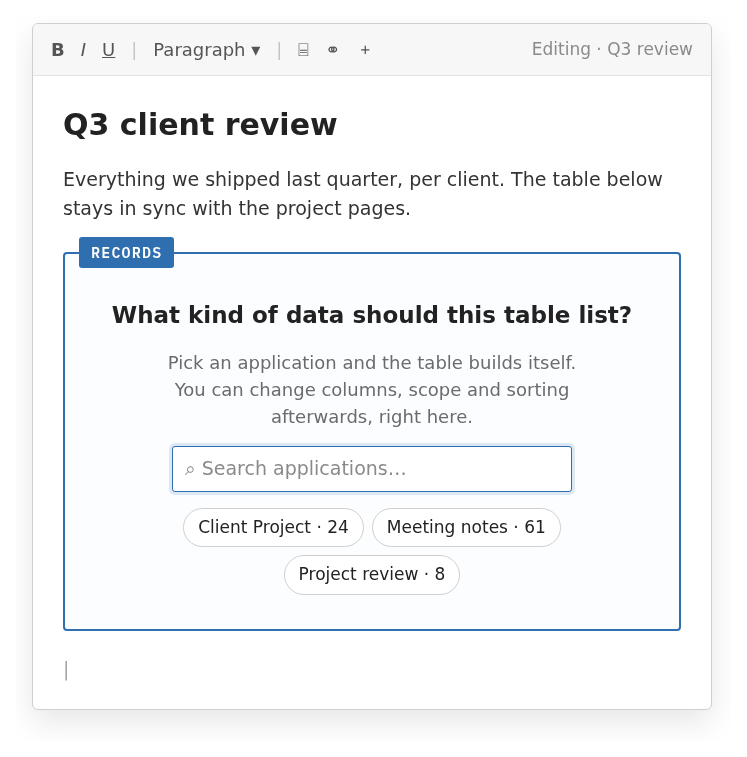
The parameters are based on custom displayers. For instance, a XClass picker is used for the XClass selection, instead of asking for a string.
The author has suggestions and live validation at all steps.
Parameters that depend on each other are hidden or disabled until the required value is set. For instance, the sort is displayed until the XClass is selected.
Or, the sorting picker only suggests fields that are sortable.
Pros
- Improved usability
Cons
- Higher development and maintenance costs
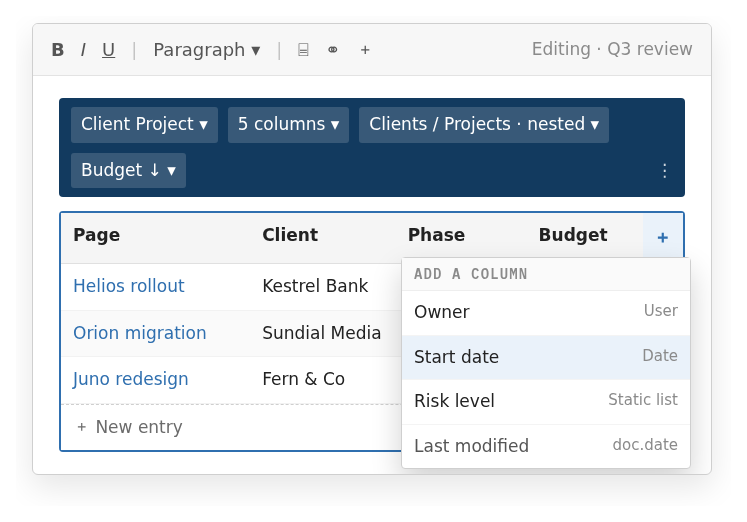
See below two UI mockups. The first one while the author is picker an XClass, the second one once an XClass is picked.
Option 2.2 - With custom displayers and custom preview
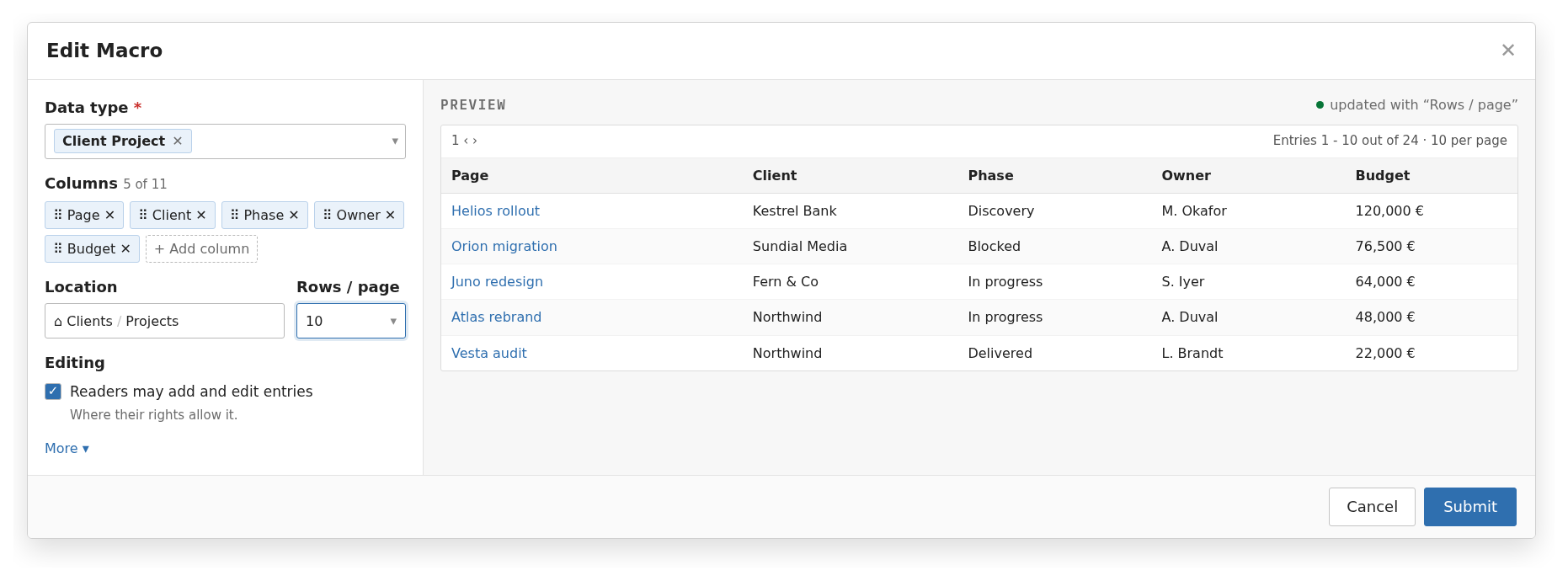
Same are 2.1, but a preview of the LD that will be displayed once the macro is inserted is presented directly in the macro form.
Pro:
- Quick usability win over 2.1
Cons:
- The notion of macro preview is already something we want to work on, and introducing an ad-hoc implementation for this macro is wasteful unless we absolutely don’t want to wait
See below a mockup UI of what it could look like.
Option 3 - In-place edition
Instead of displaying the usual macro modal, the macro has no parameters editable in the modal. Instead, the LD is tweaked to offer interactions that result in a change in parameters internally (and a refresh of the display), directly from the editor.
This is the closest to what Notion proposes.
Pro:
- Seamless integration, zero back and forth to a macro dialog to tweak the display
Cons:
- Experimental, likely the more expensive option
- Probably also harder to generalize, meaning more custom development for each macro that would match this look & feel.
I would only pick this option only if we consider XObjects listing an absolutely primordial feature that deserves a special treatment.
See below two mockup UI of what the user interactions could look like. First before an XClass is piked, then once it is selected.
Questions
Q1 - Macro name
I’m proposing the naming below, but feel free to contribute to the vocabulary proposal, and we’ll adapt the naming accordingly.
The goal being to provide a name that is easy to discover and to remember.
Macro ID: records
Macro name: Records
Q2 - Options choice
Let me know you options choice.
Conclusion
-
Q1: +1 for records
-
Q2:
- I’m -1 for Option 1 as it is not suited for non-technical users
- I’m -1 for Option 3 as it feels too much of change in comparison to what we currently do
- I’m -0 for Option 2.2 as I think the macro preview needs more design before implementation, and an ad-hoc supports does not feel ok (I would only go for that option if we absolutely want the preview and a generic implementation cannot fit the 18.x cycle)
- I’m +1 for Option 2.1 that is I believe already a significant usability improvement for non-technical users, thanks for the improved ease of use with suggestions and error reporting.
References
- Design page: https://design.xwiki.org/xwiki/bin/view/Proposal/XObjectsDisplayMacro
- Related design page for the XClass picker specifically: https://design.xwiki.org/xwiki/bin/view/Proposal/XClassPickerImprovements
- Related proposals:
- XClass picker improvements Improve the information presented in the XClass picker
- XClass picker improvement bis (focused on what entries to hide) Improve the listing of XClass in the XClass picker
- Brainstorming on the vocabulary to use in the UI End-users XClass and XObject vocabulary

