Hi everyone! 
This is a continuation of Thiago’s onboarding experience revamp proposal (link) with a focus on the in-product aspects.
More specifically, this proposal details what the Checklist Extension mentioned here, should do.
The goal of the Checklist Extension is to let the user explore and learn the main XWiki features and workflows, with practical steps. These steps would become tasks for the user.
The Checklist Extension should:
-
help the end-users of XWiki understand how to use the product
-
offer a different task selection based on the extensions installed
-
be customizable by Admins
The Checklist Application would be placed in the bottom right corner of the screen, where the “Show tour” button currently is. By default, the Checklist Application would be opened, to draw attention to itself, but users would have the ability of collapsing the application.
The Checklist Application would provide all users with a set of default tasks. For example:
- Create a page
- Comment on a page
- Add an annotation to a page
- Insert an Info macro while editing a page
- Insert a table of contents while editing a page
- Insert an image while editing a page
- Mention a user while editing a page
- Upload an attachment to a page
Going Further
The task selection would grow based on the installed extensions.
For example, if the Administrator of the wiki installs the Blog Application Extension, users that didn’t yet complete all their Checklist items, would receive a “Create a Blog Post” task.
Configuration
Administrators should be able to create, edit and delete tasks. They should also be able to categorize tasks based on user groups (e.g.: maybe only a certain group of people would be allowed to create blog posts, in that case, only those people should receive that specific task).
Other configuration options should include: disabling the addition of new tasks on extension install.
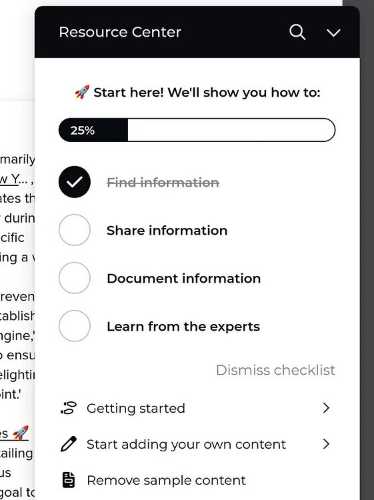
Here is a similar feature implemented by a competitor, to help visualize how it would look: